Importing Cisco Firewalls: Import from NetCollector
You can also import Cisco firewalls into NetPlanner that you have collected with your NetCollector. PIX firewalls are collected by the Device Config File Collection and Device Config File Import adapters on NetCollector. (For more information about these adapters, refer to your NetCollector User Guide).
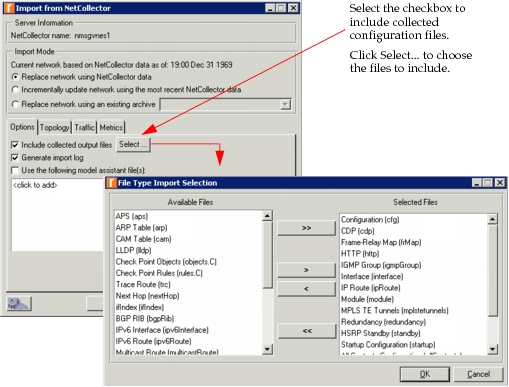
You can select the “Include collected configuration files” checkbox, as shown in Figure 151, to get the configuration files during import.
Figure 151: Import Cisco Firewall from NetCollector
Configuring NetCollector for Multiple FWSMs
When importing devices with multiple FWSMs from NetCollector, you must use the appropriate configuration steps:
- Configure Merge IDs on FWSMs
- Configure and run the following adapters on NetCollector
- Device Config File Collection
- Device Config File Import
- Other adapters as required to collect PIX OS show commands
- (Optional) Include collected configuration files when you import from NetCollector
Merge IDs
The Merge ID field is located on the Device and Platform Info tab of the NetCollector Management Console, as shown in Figure 152. The value of this field can be automatically generated with the Generate Merge IDs button or manually entered as a unique value.
Figure 152: NetCollector Device and Platform Info Tab
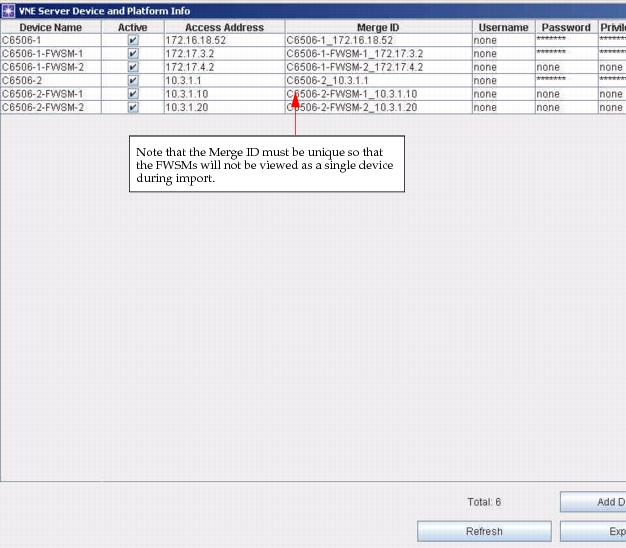
Using the button to generate Merge IDs produces a unique identifier that consists of the device name and the access address of a given device. When you generate Merge IDs for your device list, each of the FWSMs will have a unique identifier. This prevents NetCollector from seeing the FWSMs as a single device and merging the two devices together during import.