Compile Menu Operations
This section contains descriptions and procedures for using the operations available from the Compile menu in the Process Editor. The items on this menu are listed below in alphabetical order:
- Compile Code
- Compile Code (Advanced)
- Enable C++ Code Generation
- Include Temporary Variables in Diagnostic/Termination Block
- List Code
Compile Code
This operation assembles all the separate code elements from the process model (executives, code blocks, and so on) to create a single C or C++ source code file for the process. It then uses the host machine's C or C++ compiler to generate object code, as specified by the current preference settings ("comp_target_type.development_sequential_32", "comp_prog", "comp_flags_common", and so on).
Compile Code (Advanced)
This operation compiles the process model as does the Compile Code operation, but first provides a convenient interface (shown in the following figure) for specifying the types of object file to produce, compiler settings, and debugging support to include in the compiled code. You can save the settings specified in this dialog box to your preferences for future use; if not saved, they remain effective only until the Process Editor is closed.
Figure 206: Compilation of Process Model Dialog Box
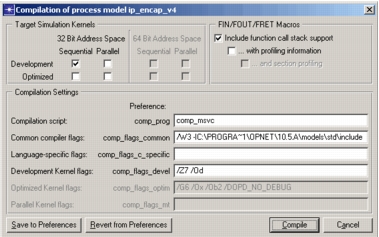
When you click the Compile button, all the separate code elements from the process model are assembled to create a single source code file for the process. It then uses the host machine's C or C++ compiler to produce one object file for each target simulation kernel selected.
Enable C++ Code Generation
This option causes the Process Editor to use a C++ compiler and generate C++ code (*.pr.cpp file) instead of C code (*.pr.c file). Setting this option is identical to putting the token OPC_COMPILE_CPP in the header block.
Note: You must use either this option (preferred) or the OPC_COMPILE_CPP token if the process model code contains constructs specific to C++.
Include Temporary Variables in Diagnostic/Termination Block
These operations control whether temporary variables should appear only in the definition of the process' FSM function or also be generated in the diagnostic block, termination block, or both.
Although these operations provide a quick way to include all temporary variables in the diagnostic or termination blocks, it is better to declare a variable used in one of those blocks directly in that block. Variables declared in the temporary variable text that are not used in a block where they are generated will be flagged by some compilers as "unused variables".
Note: Temporary variables generated in the FSM, diagnostic block, or termination block are local to their respective functions. Values set in one function are not seen by the others. Use state variables for values that need to be shared between functions.
List Code
This operation presents a dialog box showing the C or C++ language source code generated for the entire process. When a process model is created, you enter C or C++ language instructions in the form of:
- Enter and exit executives for the states
- Conditional/executive transitions between states
- Variable, macro, and function definitions
Successful completion of this operation requires that the process model has already been compiled using the Compile Code operation. When compiling the model, all the separate elements of C or C++ code for the model are pulled together into a single C or C++ source file. Then the host machine's C or C++ compiler generates the object code for the process model.
When you choose the List Code operation, a dialog box displays containing the C or C++ source code that was generated the last time the process model was compiled. If any changes have been made to the model since then, they are reflected in the displayed code.
Although you can edit the C or C++ code shown in the editing pad, the changes do not have any effect on the process model. In other words, the edits do not modify the state executives, transitions, or C or C++ code in the various blocks of the process model.