After the Dual MSFC Import
After the dual-MSFC devices are imported, the network model reflects the configurations as listed in the following table.
Table 19: Model Attributes for Device Configurations
| OS Type | MSFC Parameters.MSFC Mode | Non-Designated Router Compound Attribute |
|---|---|---|
| Native IOS (Single Router) | • Native-SSO • Native-RPR • Native-RPR+ |
Not applicable. |
| Hybrid OS, Single Router Mode | Hybrid-SRM | Not applicable. |
| Hybrid OS, Dual Router Mode (Config-Sync Enabled) | Hybrid-DRM Configuration Synchronization: Enabled |
Contains the configuration for the non-designated MSFC. |
| Hybrid OS, Dual Router Mode (Config-Sync Disabled) | Hybrid-DRM Configuration Synchronization: Disabled |
Not configured |
| Hybrid OS, Independent MSFC Devices (No redundancy) | Hybrid-Independent | Not configured |
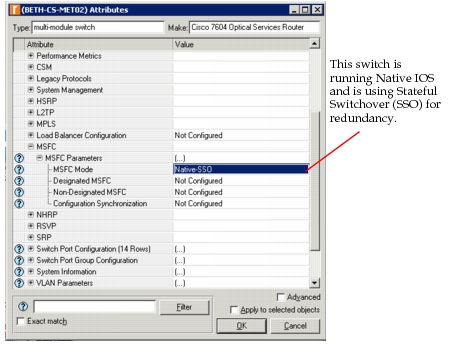
After import, you can identify the type of redundancy that is configured by examining the MSFC Mode attribute, shown in the following figure.
Figure 92: MSFC Mode Attribute
Hybrid OS
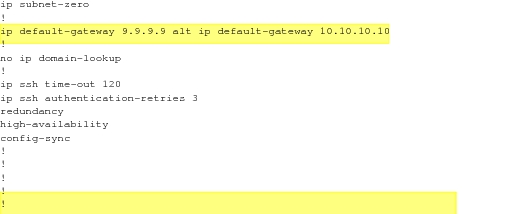
As seen from Table 18, in a multi-layer switch using Hybrid OS, you can configure redundancy on a switch that is in dual router mode (DRM) by enabling or disabling config-sync. When config-sync is enabled, one configuration file serves both MSFCs, with the "alt" keyword separating one MSFC configuration from the other. A sample configuration is shown in Figure 93. In this case, both the designated and non-designated router configurations are imported and available.
Figure 93: Sample Configuration—Dual MSFC/Config-Sync Enabled
When config-sync is disabled, each MSFC has its own configuration file, although both files must share some attributes in common, per Cisco requirements.
Import considers dual MSFCs in terms of designated and non-designated status. The designated MSFC is the one that came up first or has been up the longest. The non-designated MSFC is actively building routing tables but does not control the forwarding table.
When a switch is in single router mode, only one MSFC is active and visible to the network. The other MSFC provides hardware redundancy only.
Native IOS
A multi-layer switch using Native IOS is always in SRM and has redundancy configured in one of three ways:
- Stateful switchover (SSO)
- Route processor redundancy (RPR)
- Route processor redundancy plus (RPR+)
Note: Figure 92 shows the supported redundancy modes.
The exact attribute mapping and supported commands are described on the Riverbed Support website: http://support.riverbed.com. Look for Supported Vendor Protocols and Commands.
For information on the "show" commands required to properly import devices with dual MSFCs, see Table 16.