Dual MSFC Feature Support for Import
The MSFC adds routing functionality to the switch. With dual MSFCs, the multi-layer switch has redundancy capabilities that can be configured in different ways, depending upon the OS type: Native IOS or Hybrid OS. The following table lists the various configurations and the files required during import.
Table 18: Required Files per Configuration Type in Cisco Catalyst 6000 Switches
| OS Type | Router Mode | Redundancy Mode | # of Active Routing MSFCs | Config Files Required |
|---|---|---|---|---|
| Hybrid OS | Dual | Config-Sync Enabled | 2 | • One IOS Config File • One CatOS Config File |
| Hybrid OS | Dual | Config-Sync Disabled | 2 | • Two IOS Config Files • One CatOS Config File |
| Hybrid OS | Single | Not Configured | 1 | • One IOS Config File • One CatOS Config File |
| Native IOS | Single | SSO – Stateful Switchover | 1 | • One IOS Config File |
| Native IOS | Single | RPR – Route Processor Redundancy | 1 | • One IOS Config File |
| Native IOS | Single | RPR+ – Route Processor Redundancy Plus | 1 | • One IOS Config File |
Note: Cisco Catalyst 5500 multi-layer switches with dual route switch modules (RSM) are imported as multi-module switches with only one RSM configuration file.
Importing from NetCollector
When importing devices with dual MSFCs from NetCollector, you must use the appropriate configuration steps:
- Configure Merge IDs on MSFCs
- Set control option to FALSE in the Device Config File Import adapter
- Include collected configuration files
Merge IDs
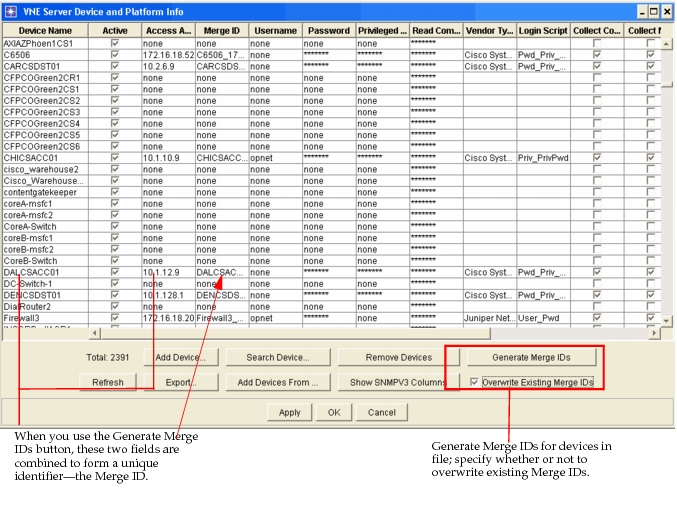
A new field, Merge ID, is present in the Device and Platform Info tab of the NetCollector Management Console. The value of this field, as shown in Figure 89, can be automatically generated with a new button or manually entered as a unique value. Using the button to generate Merge IDs produces a unique identifier that consists of the device name and the access address of a given device. When you generate Merge IDs for your device list, each of the two MSFCs will have a unique identifier. This prevents NetCollector from seeing the MSFCs as a single device and merging the two devices together during import.
Figure 89: Device and Platform Info - Merge ID
Device Config File Import Options
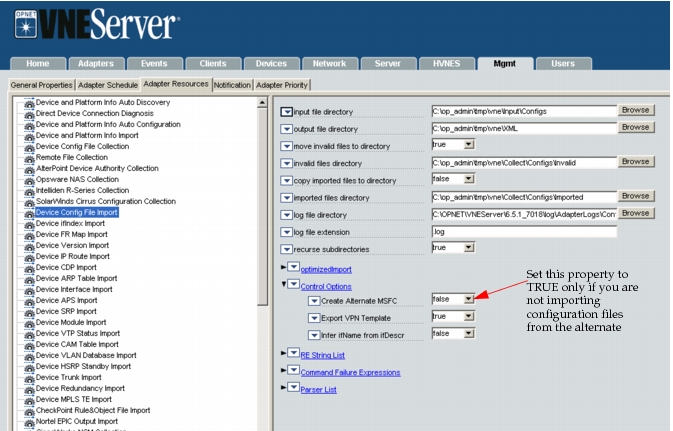
An option is present for the Device Config File Import adapter in NetCollector 3.5 that allows you specify whether the adapter should automatically create alternate MSFCs. The default value of this property is FALSE.
- FALSE – (default) Set this attribute to false if you are importing configuration files for both the primary and alternate MSFCs.
- TRUE – Set this attribute to true if you only have the primary MSFC configuration file available and wish to have both the primary and alternate MSFCs in your network model.
Key Concept—If the configuration files are available for both MSFCs, there is no need for NetCollector to create the alternate MSFC. Setting the property to TRUE in this case results in duplicate MSFCs in your network model.
Figure 90: Control Options for Device Config File Import
Note: You must ensure the correct settings in NetCollector to perform analysis on dual MSFCs, as described in the next section.
Include Collected Configuration Files
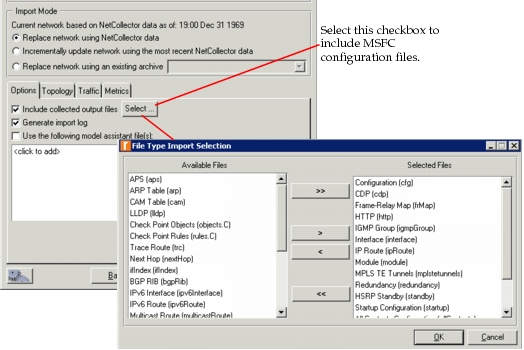
As with any import from NetCollector, if you want to import the device configuration files during the import, you must select the "Include collected configuration files" checkbox, as shown in the following figure.
Figure 91: Import From NetCollector Dialog Box