Edit/View Comment Log
This operation lets you keep update, modification, and other information about a model. The comment log stores each comment along with the date and time it was entered, the model version, and the name of the user who added it. This enables users to notify each other of recent changes and to archive historical information.
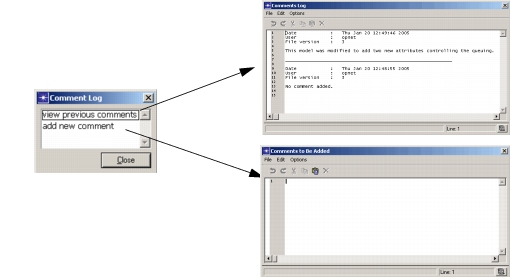
Comments can be added or viewed, but not modified. When adding comments, you enter information into a text edit pad. When viewing comments, you see a view-only text edit pad listing all comments that have been previously added to the file, starting with the most recent modification. While using the comment log, you cannot change or delete previously added comments; to do so, use the program described in “Program Descriptions” on page 143.
GUI programs automatically prompt for comments when the user lock is reset, as described in Set/Reset User Lock.
Procedure 239: Viewing or Editing a Comment Log
-
Make sure the model whose comments you want to access is in the active editor window.
-
Click the Edit/View Comment Log toolbar button.
Result: The Comment Log dialog box pops up.
-
Choose the desired operation:
- To see the existing comments, select View Previous Comments from the dialog box.
- To add a new comment, select Add New Comment.
Result: An edit pad for the selected operation pops up.
-
Read or add comments, then close the pad.
For instructions about using edit pads, see “Text Edit Pads” on page 10.