Path Menu Operations
This section contains descriptions and procedures for using the operations available from the Path menu in the Path Editor. The Path menu operations include:
Model Attributes
This operation opens the Model Attributes dialog box, which allows you to create, edit and delete path model attributes. Attributes are essentially “parameters” of the model, allowing users to control the model’s behavior in predefined ways. Path attributes are automatically promoted to the network level, where they appear as attributes of path objects.
Figure 214: Model Attributes Dialog Box
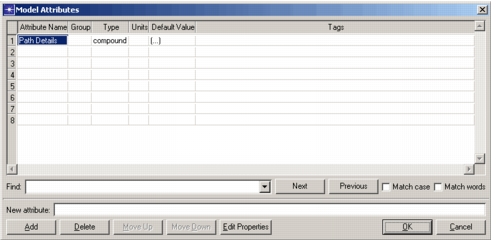
Attributes make path models more robust and reusable. You can create an attribute to represent a particular characteristic of a path, rather than “hard-wiring” that characteristic into the model. Users can then configure the attribute appropriately in each instance of the path. Process models or pipeline stages may use different path object attributes to simulate different model behaviors. Attributes also allow users to run multiple simulations and automatically sequence through scenarios that differ only in their attribute settings. For these reasons attributes are preferable to creating a large number of models, each of which represents a unique set of “parameter settings”.
For general information about paths and model attributes, see "Modeling Concepts".
Local Statistics
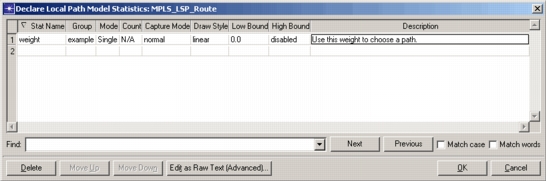
This operation declares named statistics that can be selected in the Probe or Project Editors; then process models or pipeline stages can use these statistics to collect path data during a simulation. Local statistics are scoped to each path, so different path models can maintain local statistics with the same name. These statistics vary over time and can support multiple probes.
This operation opens the Declare Local Statistics dialog box, which you can use to create, delete and modify local statistics. See "Global Statistics" on page 487 for a description of the fields in this dialog box.
Figure 215: Declare Local Path Model Statistics Dialog Box
For more information about local statistics, see:
Self Description
This operation allows you to set the information about a path used to match path models to the objects defined in an imported topology. The self description specifies information such as what type of interfaces the path supports.
Figure 216: Path Self Description Dialog Box
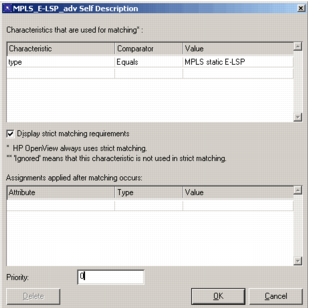
A self description has three basic parts:
-
Characteristics used for matching – Specifies the path model characteristics to match with the characteristics of paths in an imported topology. Each characteristic has a value and a comparator. The comparator specifies what relationship must exist between the values of a characteristic for the path model and a path in the imported topology for a match to occur, as defined in the following table.
Table 109: Requirements Comparators
Comparator Meaning Equals The imported path’s value must equal that of the path model. One-of The imported path’s value must equal one of the values listed for the path model. Range The imported path’s value must be in the range specified for the path model. Contains The imported path’s value must contain that of the path model. -
Assignments – These specify attributes that will be assigned to the path model when it is chosen to represent an imported path.
-
Priority – During topology import, if more than one path model matches an imported path, the model with the highest priority is used.
Procedure 214: Creating a Path Self Description
-
Choose Path > Self Description.
Result: The Self Description dialog box opens.
-
Specify any requirements and assignments for the path model.
-
Set the priority for the path.
-
Click OK to close the Self Description dialog box.