Importing Juniper NetScreen Firewall: Introduction
Juniper NetScreen firewall is an integrated network security solution that comprises a network appliance bundled with the ScreenOS operating system. You can import the configuration of Juniper NetScreen firewalls from NetCollector.
System Requirements for Import of Juniper NetScreen Firewall
Support for import from Juniper NetScreen firewall is provided with the following products:
- NetPlanner
- NetCollector
Juniper NetScreen Firewall Support for Analysis
After import, you can leverage some of the supported NetScreen configurations in Flow Analysis. Additionally, NetDoctor provides certain rules that you can use to further analyze your network. Table 22 lists NetScreen features and indicates support.
Table 22: Support for NetScreen Features
| Imported NetScreen Feature | Flow Analysis | NetDoctor Rules¹ |
|---|---|---|
| Security Zones | Yes | Yes |
| Virtual Routers | Yes | Yes |
| Dynamic Routing Configuration for Each VR | Yes | No |
| Static Routes with Next-Hop Pointing to Another VR | Yes | No |
| Export and Import of Routes between VRs | Yes | No |
| Forwarding Tables for Each VR | Yes | No |
| Policy-Based Routing | Yes | Yes |
| Policy-Based VPNs | Yes | No |
| Route-Based VPNs | Yes | No |
| NAT | No | No |
| PAT | No | No |
| Multicast Routing | No | No |
| Tunnel Zones | No | No |
| Layer-2 Forwarding | No | No |
| Interface Mode: Transparent or NAT | No | No |
Note 1: If no preconfigured rules exist, you can use rules in the Organizational Policies rule suite to check the ScreenOS configuration. See the NetDoctor User Guide for more information.
Security Zones
This section discusses security zones. A security zone is a logical entity to which one or more interfaces are bound. ScreenOS includes three default security zones: Trust, Untrust, and DMZ (Layer-3), or V1-Trust, V1-Untrust, and V1-DMZ (for Layer-2). You can use these default security zones in addition to user-defined zones. Figure 131 shows the three default zones configured plus two user-defined zones: HR and Operations. Once the security zones are configured, the NetScreen firewall administrator can add interfaces to the zones and configure policies that regulate traffic between and within the zones. The policy engine on the NetScreen firewall contains this regulatory information.
Note: Network Address Translation (NAT) and transparent modes for interfaces are not currently supported. Only interfaces in route mode are supported.
Figure 131: Example of Security Zones in a Network
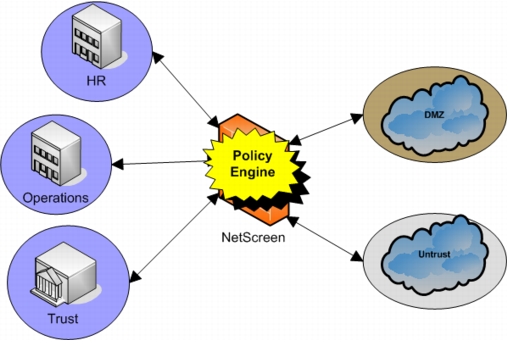
Note: Each security zone can have one or more interfaces bound to it, a concept shown more specifically in Figure 133.
Security zones are imported into the model attributes as shown in Figure 132.
Figure 132: Security Zones Attributes
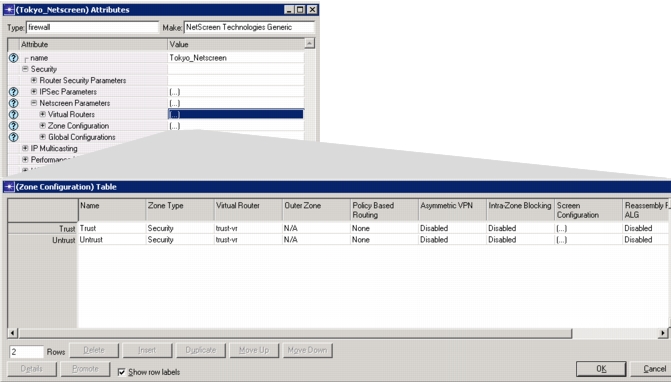
Note: Only security zones, no tunnel zones, are currently supported in NetPlanner.
Virtual Routers
Juniper NetScreen firewall also uses the concept of a virtual router. A virtual router (VR) functions as a router, having its own interfaces and its own unicast and multicast routing tables. Two predefined VRs exist on the firewall: trust-vr and untrust-vr. Even though both VRs are already defined, you must either export routes between the VRs or create a static route between them, if you want to pass traffic between the VRs during an analysis.
Note: Multicast routing is not supported for this release.
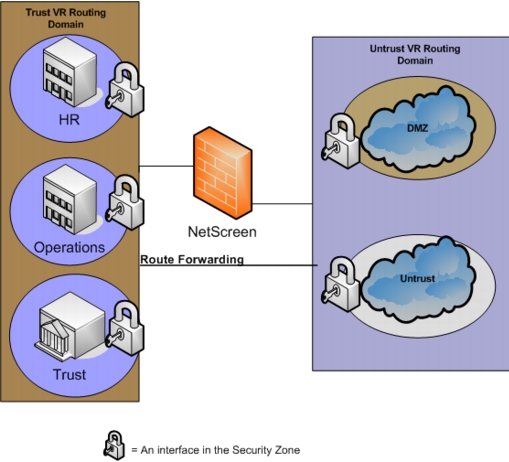
The network example shown in Figure 133 has security zones assigned to the predefined virtual routers. Both predefined and user-defined security zones are in use, with one interface per security zone. This is a simple network example; each security zone could have multiple interfaces assigned. An interface allows traffic to pass into and out of the security zone with which it is associated, while security policies dictate how traffic flows between interfaces.
Figure 133: Example of Virtual Router Configuration
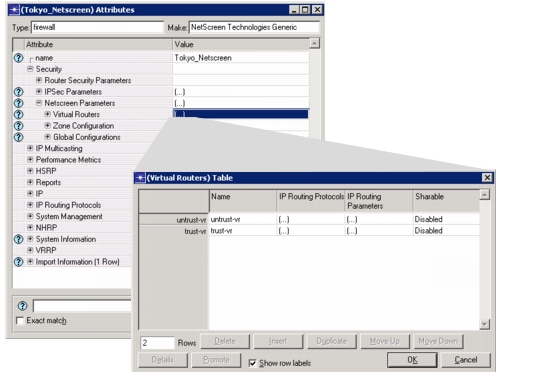
Virtual routers are imported as shown in Figure 134.
Figure 134: Virtual Router Attributes
Virtual Private Networks
The Juniper NetScreen firewall supports several types of virtual private networks (VPN) between sources and destinations in the network. The following types of VPNs are supported for analysis in NetPlanner:
-
Policy-Based VPN
A policy-based VPN is a NetScreen configuration in which a VPN is referenced in the security policy with an Action of “tunnel.”
-
Route-Based VPN
A route-based VPN is a NetScreen configuration that, unlike the policy-based VPN, does not have a rule that references a VPN tunnel. Traffic is routed to a tunnel interface that in turn references a tunnel. Components of a route-based VPN include
- A tunnel, consisting of a tunnel name, tunnel source/destination, and encapsulation
- One or more tunnel interfaces bound to a security zone
- A one-to-one or one-to-many relationship between a tunnel interface and tunnel(s). In a one-to-many relationship, the interface is bound to multiple VPNs using Next Hop Tunnel Binding (NHTB) with a destination of a tunnel.
- Action is “Permit” or “Deny”