Installation Directory (<install_dir>)
The installation directory (<install_dir>) is the directory where the release media contents are installed. The installation directory is an important reference location on the disk. This location is defined in Modeler by the “opnet_dir” preference. It is usually represented in documentation by the symbol <install_dir>, especially when it appears as part of a path name, as in <install_dir>/18.6/sys/include.
The symbol <install_dir> represents an actual directory located somewhere in the file system. The user (or system administrator) has the freedom to select the location of <install_dir> and create the directory there; no hardwired location is required. On Windows, the default location is c:\Riverbed. On Linux, one of the typical locations for <install_dir> is in the /usr directory (for example, /usr/riverbed). This location is beneficial when several users with different accounts need access to Modeler. In this case, <install_dir> is owned by the root or system administrator account, with read and execute permissions set up for other accounts.
Another common location for <install_dir> is within a user home directory. This location is useful when only one user requires access to Modeler and it is preferred to handle all system administration tasks locally. In this case, <install_dir> should not be given the name <HOME>/opnet, because this name may conflict with execution of the opnet program in the home directory.
Because the installation directory stores all Riverbed analysis software (including software for different solutions, releases, and workstation architectures), there typically is only one installation directory per installation site. Even when several workstations are used to execute Modeler, all of the workstations can share a single <install_dir> located on a file server (via the Network File System, NFS, or a similar system).
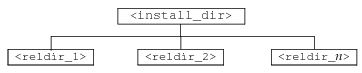
The installation directory contains one or more release directories (<install_dir>/<release>). These directories contain the system software and standard models for a particular release of Modeler. There is always at least one release directory.
When installed, new releases replace the existing files within the subdirectory, but the top-level organization remains unchanged. The following figure depicts this organization.
Figure 2: Installation Directory Organization
Release Directory (<reldir>)
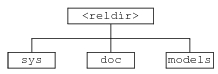
The release directory (<install_dir>/<release>, or simply <reldir>) contains the complete software and model files for a specific release. A release is a distinct version of Modeler that typically incorporates new features or major bug fixes. A release directory is identified by a name such as 18.6.
Each release directory contains three subdirectories:
Table 1: Subdirectories in the Release Directory
| This subdirectory... | Contains... |
|---|---|
| sys | system software for the corresponding release |
| doc | data files used by the documentation viewer |
| models | models supplied with Modeler |
The following figure depicts this organization.
Figure 3: Release Directory Organization
If you download a release or software update into an existing <reldir> directory, it replaces the existing files within these subdirectories, but the top-level organization remains unchanged. Typically, however, a new release goes into a new <reldir> directory, in which case any existing <reldir> directories (and their contents) remain unchanged. The names and locations of subdirectories under each <reldir> directory should not be modified after installation.
System Directory (sys)
The system directory (<reldir>/sys) contains software and support files, including all programs, libraries, and header files. The organization of sys is copied from the release media and remains fixed. The contents of sys subdirectories vary somewhat during installation and software updates, but remain fixed during use of the software (that is, no non-installation programs modify the contents of the sys directory and its subdirectories).
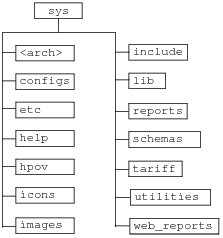
Because sys contains all of the software, it is a resource that can be shared by multiple users. It is also possible that more than one version of Modeler will be present at a site, due to different machine architectures. The software for different architectures is stored in individual subdirectories.
The following table lists the subdirectories in the sys directory:
Table 2: Subdirectories in the System Directory
| Directory | Contains |
|---|---|
| configs | Code for the menus called by .ets files |
| etc | Files related to third party products |
| help | HTML help files |
| hpov | Registry setting for interaction with HP OpenView |
| icons | Icon databases |
| images | Maps, splash screens, and web images |
| include | Header files used during the compilation of process models |
| lib | Python files |
| reports | Report templates for Flow Analysis functionality |
| schemas | Report schemas for NetDoctor functionality |
| tariff | Data files for Flow Analysis functionality |
| utilities | Miscellaneous files that do not fall under any other category |
| web_reports | Images and code used in web reports |
The following figure shows this organization.
Figure 4: System Directory Organization
Configuration Directory (configs)
The configuration directory (<reldir>/sys/configs) contains files used to specify the configuration of the user interface, such as menu items and shortcuts. These files have the file extension .ets.
Miscellaneous Directory (etc)
The miscellaneous directory (<reldir>/sys/etc) contains miscellaneous files and utilities.
Icon Directory (icons)
The icon directory (<reldir>/sys/icons) is the standard location for files containing icons used by GUI-based programs. (Another common location is each user’s administration directory.) Icon databases can be stored anywhere, however, so long as you specify the location by including the icon database directory in the value of the “mod_dirs” preference.
Icon databases in directories listed earlier in “mod_dirs” override corresponding databases in directories specified later in the list. Typically, the system and program icon databases remain in the icon directory, unmodified and unoverridden, and user’s special icons are stored in the user icon databases within their administration directories. In this case, the administration directory appears before the icon directory in the “mod_dirs” list.
The “icon_dbs” preference specifies which icon databases a particular application should use. GUI-based Riverbed programs use three types of icon databases.
Table 3: Types of Icon Databases
| Icon database | Contents |
|---|---|
| sys.icons | System icon database contains icons used in most GUI-based programs. |
<program>.icons |
Separate program icon databases exist for each GUI-based program (such as modeler or op_vuanim). These databases contain icons specific to the corresponding program. |
<name>.icons |
User icon databases contain user-defined icons created with the Icon Editor. |
In addition to the icons in these databases, a special “missing” icon is built into GUI programs. A program displays this icon when it can locate neither the specified icon (usually a user-defined icon) nor an appropriate default icon.
Image Directory (images)
The image directory (<reldir>/sys/images) contains bitmap image files used by Modeler programs, such as splash screens, maps, and various images used by web reports.
Include Directory (include)
The include directory (<reldir>/sys/include) contains the Riverbed header files. Header files are C language files that contain symbolic constants, data structure definitions, and preprocessor macros. Each of the header files contained in include has the conventional .h suffix. Explanations of individual header files are not provided here because you do not need to individually reference these files.
Help Directory (help)
The help directory (<reldir>/sys/help) contains HTML and related files that describe dialog boxes.
Models Directory
The models directory (<reldir>/models) contains the models that are included on the release media. The organization of models, like that of sys, is initially obtained from the release media and generally remains fixed.
Table 4: Contents of the models Directory
| This subdirectory... | Contains... |
|---|---|
| module_ref | Reference files used by optional product modules. |
| std | Models of basic nodes and links, plus example network models. |
| tutorial_ref | Reference files showing correct results for models created from the tutorials. |
| vendor_models | Device models based on many different sources, including studies conducted at the Harvard Network Device Test Laboratory and product data from the device makers. |
You can use the models in the std subdirectory as guides or as a basis for developing your own network models.
Module Reference Models Directory (module_ref)
The module reference models directory (<reldir>/models/module_ref)) contains reference models used by optional product modules.
Standard Models Directory (std)
The standard models directory (<reldir>/models/std) contains models developed for and shipped with Modeler. These models include the basic nodes and links used to develop networks, as well as complete network models.
The organization of std is initially obtained from the release media and generally remains fixed.
Tutorial Reference Models Directory (tutorial_ref)
The tutorial models directory (<reldir>/models/tutorial_ref)) contains reference models for the tutorials. Reference models are completed examples of the files created in each lesson. The required models for the tutorial exercises are in the <reldir>/models/std/tutorial_req directory.
Vendor Models Directory (vendor_models)
The vendor models directory (<reldir>/models/vendor_models) holds models based on a variety of sources, including studies conducted at the Harvard Network Device Test Laboratories (HNDTL) and generally-available product data from the device makers.
No proprietary information was provided by device manufacturers.
Documentation Directory (doc)
The documentation directory (<reldir>/doc) contains files for the documentation and help. These files include product documentation and tutorials.