Toolbar Buttons
The Filter Editor has toolbar buttons for frequently-used operations.
Figure 240: Toolbar Buttons (Filter Editor)
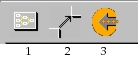
The followong table lists the name of each toolbar button—the name appears as a tooltip when you rest the cursor on the button—and its equivalent menu command.
Table 133: Toolbar Buttons in the Filter Editor
| Button | Name in the Toolbar | Equivalent Menu Command |
|---|---|---|
| 1 | Create Filter Element | Objects > Create Filter Element |
| 2 | Create Connection | Objects > Create Connection |
| 3 | Compile Filter Model | Objects > Compile Filter Model |
To configure the toolbar buttons, see "Configuring the Toolbar" on page 7.