Demand Editor Dialog Box
The Demand Editor lets you define demand models; each demand object’s underlying model determines its attribute interfaces, presentation, and behavior. For more information about the relationship between demand objects and demand models, see “Modeling Network Traffic” on page 1.
You create or modify the demand model specifications described in this section in the Demand Editor dialog box, shown in the following figure.
Figure 217: Demand Model Editor
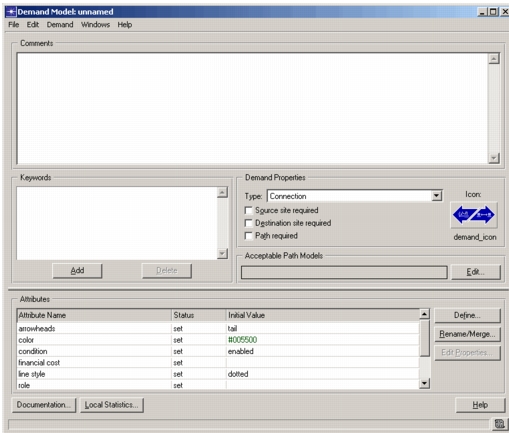
A demand model specifies the following information:
-
Type – A demand can be one of two types: a connection or a flow. Connection are useful for defining pipelines or reservations between nodes such as PVCs or reserved bandwidth. Traffic flows are useful for defining conversation-pair traffic. A traffic flow generally defines two nodes (traffic source and destination) and one or more traffic profiles that specify the rate of traffic.
-
Source/Destination Required – A demand model can (or might not, in the case of point demands) require a traffic source and destination.
-
Path Required – With this option enabled, every demand object of this type must include a path object in its definition.
-
Keywords – Model keywords allow you to selectively display models that meet certain characteristics in the Project Editor object palette. You can define one or more keywords to define a demand’s characteristics.
-
Model Comments – Each demand model contains a set of comments that describe its characteristics, potential applications, and any information that may be of interest to a user of the model. Because users of other OPNET solutions do not have access to demand model internals, the comments may provide the primary available information about the model’s capabilities and interfaces. Embedding documentation on the model’s interfaces as an intrinsic part of the model itself provides convenient access to information for model users and helps to ensure that model documentation remains consistent with a model as it evolves through different phases of development.
-
Attribute Interfaces – Demand models can provide specifications for the attributes of demand objects in the Project Editor. Like link models, demand models contain no objects that can promote attributes; therefore the only attributes that a demand can promote are the “Demand model attributes” described later. Like link and path models, a demand model can specify configuration information for built-in attributes of the demand object. Specifically, operations that are possible are attribute pre-assignment, attribute hiding, attribute renaming, and changing of attribute properties.
For more information about these mechanisms, see Chapter 4 “Modeling Framework” on page 80.
-
Local Statistics – The Local Statistics button is functionally equivalent to choosing Local Statistics from the Demand menu; see Local Statistics for details.