Link Menu Operations (Link Editor)
This section contains descriptions and procedures for using the operations available from the Link menu in the Link Editor:
Model Attributes
This operation opens the Model Attributes dialog box, which allows you to define new link model attributes and to edit or delete existing ones. Link model attributes are essentially “parameters” of the model, allowing users of the model to control its behavior in predefined ways. Link model attributes are automatically promoted to the network level, where they appear as attributes of link objects.
Figure 210: Model Attributes Dialog Box
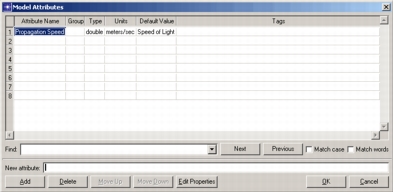
One important function of link model attributes is to generalize the applicability of a link model. Specifically, rather than embed a fixed characteristic into a link model (such as a “hardwired constant”), this same characteristic can instead be represented by a link model attribute. Each instance of the link model can then be configured independently with respect to this characteristic. Pipeline stages that implement the underlying behavior of the link can obtain the value of the attribute to adjust their behavior in appropriate ways.
In this way, the link model has achieved a greater degree of reusability, by supporting a broader set of applications. The alternative is to create many link models that are nearly identical except for a small number of characteristics, or “parameters”. This is a less desirable approach because it entails maintaining a larger implementation and requires continually duplicating link models as slight variations become necessary. Furthermore, by using link model attributes to parameterize behavior, simulation sequences can automatically sequence through different scenarios simply by changing attribute values.
For more information about link model attributes and on model attributes in general, see "Modeling Concepts".
Local Statistics
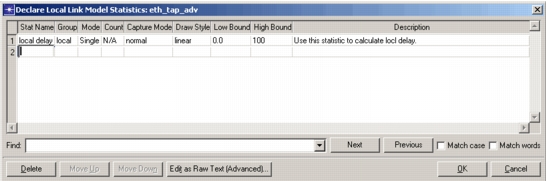
This operation declares named statistics that can convey information between pipeline stages of the same path object, as well as path statistic probes in the Probe Editor. Local statistics are scoped to each path object, so different paths can maintain local statistics with the same name. These statistics vary over time and can support multiple probes.
This operation opens the Declare Local Statistics dialog box, which you can use to create, delete, and modify local statistics. See "Global Statistics" on page 487 for a description of the fields in this dialog box.
Figure 211: Declare Local Link Model Statistics Dialog Box
For more information about local statistics, see:
Self Description
This operation defines the link information used to match link models to the links in an imported topology. The self description specifies information such as what type of interfaces the link supports (such as Ethernet or ATM).
Figure 212: Link Self Description Dialog Box
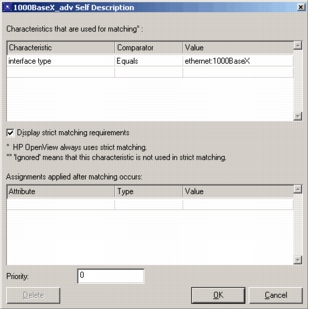
A self description has three basic parts:
-
Requirements – These specify the link model characteristics used to match against the characteristics of links in an imported topology. Each characteristic has a value and a comparator. The comparator specifies what relationship must exist between the values of a characteristic for the link model and a link in the imported topology for a match to occur, as defined in the following table.
Table 106: Requirements Comparators
Comparator Meaning Equals The imported link’s value must equal that of the link model. One-of The imported link’s value must equal one of the values listed for the link model. Range The imported link’s value must be in the range specified for the link model. Contains The imported link’s value must contain that of the link model. -
Assignments – These specify attributes that will be assigned to the link model when it is chosen to represent an imported link.
-
Priority – During topology import, if more than one link model matches an imported link, the model with the highest priority is used.
Procedure 213: Creating a Link Self Description
-
Choose Self Description from the Link menu.
Result: The Self Description dialog box opens.
-
Specify any requirements and assignments for the link model.
-
Set the priority for the link.
-
Click OK to close the Self Description dialog box.