Transition Object
Processes may transfer execution control from one state of their STD to another. A state transfer occurs when a process is blocked in an unforced state and an interrupt occurs. Also, processes transfer out of a forced state without pausing, after its executive statements have been executed.
Transition objects are used to specify the possible transfer of a process between states and the conditions under which state transfers take place. Each transition object describes the possible transition between a source state and a destination state. A transition may have a condition statement specified by its “condition” attribute, and an executive statement, specified by its “executive” attribute. When the process reaches the end of the exit executives of the source state, if the condition statement evaluates to true, the transition is followed and the executive statement is executed.
The following figure shows a graphical representation of a typical transition (ARRIVAL is the condition statement and q_pk () is the executive statement).
Figure 2: Transition Representation
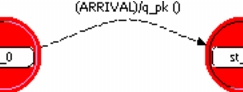
The following table lists the built-in attributes of the transition object.
Table 2: Transition Object Built-In Attributes
| Name | Data Type |
|---|---|
| color | color |
| condition | string |
| drawing style | enumerated |
| executive | string |
| name | string |
color
This attribute specifies the color of a transition. It is used for visual and organizational purposes only and does not affect the operation of the transition. A user might want to specify colors to transitions to highlight their properties or identify their role in the process model. This attribute is only effective when the process model is viewed on a color display. Any of 64 different colors may be chosen from a color palette. The color name has the prefix “RGB” and a suffix of three integers that represent the respective components of red, green, and blue in the color. For example, RGB000 is black (zero parts red, zero parts green, and zero parts blue), RBG330 is bright yellow (three parts red, three parts green, and zero parts blue), and RGB333 is white (three parts red, three parts green, and three parts blue).
| Editing | Simulation | |
|---|---|---|
| Data Type | color | not applicable |
| Access | read/write | not applicable |
| Default Value | RGB333 | |
| Units | ||
| Constraints |
condition
This attribute specifies a C or C++ expression, evaluated as a Boolean, which determines whether or not a transition will be followed by the process. If the boolean expression is evaluated as true (non-zero) when the process has completed the exit executives of the transition’s source state, the transition is followed. The condition can contain references to the process’ state and temporary variable, to the properties of the event that has just caused the process to be invoked, and in general to the state of the system model. If a condition is omitted, then the transition is referred to as unconditional and will necessarily be traversed by the process.
| Editing | Simulation | |
|---|---|---|
| Data Type | string | not applicable |
| Access | read/write | not applicable |
| Default Value | valid boolean expression | |
| Units | ||
| Constraints |
drawing style
This attribute specifies how a transition is drawn. Valid values are
- line – Specifies the transition is displayed as a series of straight line segments, with vertices defined by the user when the transition is created.
- spline – Specifies the transition is displayed as a smooth curve that passes through all of the vertices.
This attribute does not effect the operation of the transition.
| Editing | Simulation | |
|---|---|---|
| Data Type | enumerated | not applicable |
| Access | read/write | not applicable |
| Default Value | spline | |
| Units | ||
| Constraints |
executive
This attribute describes actions which are implemented if the transition is traversed. These actions are implemented before entering the transition’s destination state and immediately after completing the execution of the source state’s exit executives and evaluating the transition’s condition. Typically this attribute is used for associating an action with a state, but only when it is entered under specific circumstances. For example, the destination state may be entered from several different source states, and in each case a different action may be required. In such a situation, the destination state’s enter executives are not an appropriate location for these actions because they are executed regardless of the previously occupied state.
| Editing | Simulation | |
|---|---|---|
| Data Type | string | not applicable |
| Access | read/write | not applicable |
| Default Value | (empty) | |
| Units | ||
| Constraints | any valid C or C++ statements |
name
This attribute is a text string used to assign a name to a transition. It is used for organizational purposes only (usually for printing model reports), and does not effect the behavior of the transition.
| Editing | Simulation | |
|---|---|---|
| Data Type | string | not applicable |
| Access | read/write | not applicable |
| Default Value | “tr_n”: n is an integer | |
| Units | ||
| Constraints |