op_cvos
A utility that converts the contents of a scalar output file (file type suffix .os) into a user-editable ASCII text file; op_cvos can also perform the reverse conversion.
Description
Prior to release 12.0, output scalar files were used to record and store scalar statistic values from multiple simulations. The op_cvos utility program converts an output scalar file to an ASCII format General Data File (GDF, file type suffix .gdf), and vice versa. This allows users to manually extract data points from an existing output scalar file, or insert new data points. Users are free to edit the resulting ASCII version of the data in the GDF using a text editor or a Riverbed Modeler editing pad. Although op_cvos is typically used for patching operations on output scalar files, it can also be used to obtain scalar data in ASCII format for inclusion in reports.
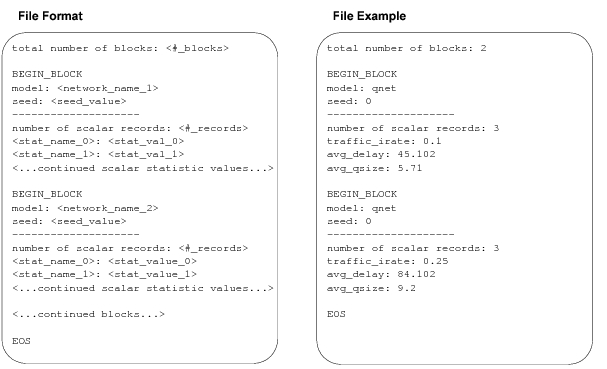
The format of the generated GDF files, as well as an example of such a file, appear on the next page. In the format, the term block corresponds to a single simulation run. The scalar statistic values recorded during a particular simulation run are grouped together in a common block. This example includes two simulation runs of the model qnet.
Figure 18: op_cvos-Generated GDF Files
Preferences
This program supports the following preference sets:
- “Standard Preferences”
- “Diagnostics” preferences
- “User Lock” preferences
This program also supports the following additional preferences.
from_text
Specifies that the reverse conversion of a General Data File (file type suffix .gdf) into an output scalar file (file type suffix .os) is to be performed. The base name of the GDF is specified via the m preference; the resulting output scalar file name is based on this value. This preference is mutually exclusive with the to_text preference (either from_text or to_text should be set to TRUE, but not both).
- Type: boolean
- Default Value: FALSE
m
Specifies the base name of the file to be converted (either an output scalar file or a GDF). The file path or file type suffix should not be included in the value of this preference. If the to_text preference is set to TRUE, the m preference specifies the name of the output scalar file that is to be converted to a GDF. If the from_text preference is set to TRUE, the m preference specifies the name of the GDF that is to be converted to an output scalar file.
This preference is required and can be entered only from the command line.
- Type: string
- Default Value: none
sort_key
Specifies the name of a scalar statistic within the input file (either an output scalar file, or a GDF, depending on the direction of conversion). The specified statistic will be used as the sort key for the generated output file. Blocks (simulation runs) will be arranged in order of ascending values of the sort_key-identified statistic.
- Type: string
- Default Value: “”
to_text
Specifies that the forward conversion of an output scalar file (file type suffix .os) into a General Data File (file type suffix .gdf) is to be performed. The name of the scalar output file is specified via the m preference; the resulting GDF name is based on this value. This preference is mutually exclusive with the from_text preference (either from_text or to_text should be set to TRUE, but not both).
- Type: boolean
- Default Value: FALSE
Example Usage
% op_cvos -to_text -m gmc_net
Reading Input File
Converting...
Writing Output File
Done.
%
This example converts the scalar file, gmc_net, to an editable ASCII file. The new file will appear in the models directory as gmc_net.gdf.