sconfirm
Prints a list of the static preferences and their values. The list gives the name, the source of the current value, and the current value itself for each preference of the program. This preference can be used only from the command line.
| Data Type | Default Value |
|---|---|
| boolean | FALSE |
When using any program, it is sometimes useful to confirm that its static preferences are being set to appropriate values. This is especially a concern when several preference mechanisms are being used simultaneously, leaving some question as to the final value of a preference. The sconfirm preference prints a list of all static preferences and their assigned values on the standard output shortly after the program starts executing. It does not otherwise affect execution of the program.
The sconfirm preference is often used in conjunction with the envp and enva standard preferences, which print the environment settings in precedence and alphabetic order, respectively.
The following example shows part of an sconfirm preference list. There are four sources given for the preference values:
- cmd line – The preference is set by a command line flag.
- default – The preference is not set by any environment mechanism (and thus has its default value).
<prefs_file>– The preference is set by the named environment file, which either is specified by the-efcommand line flag or is the preferences file.- shell var – The preference is set by a shell variable.
Figure 17: Sample sconfirm Preference List
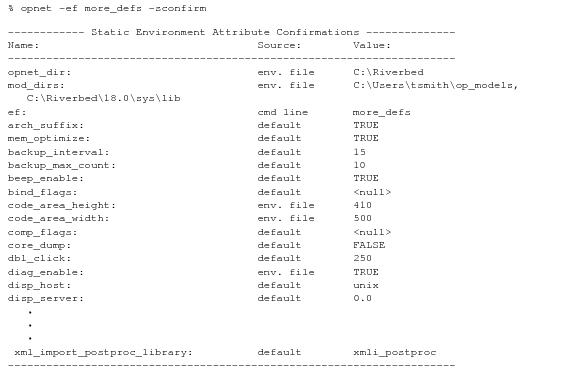
In the figure above, several static preferences obtain their values from an environment file specified by the command line flag -ef more_defs. The contents of the file more_defs.ef appear below.
# more_defs.ef Environment File
diag_enable:                         TRUE
code_area_height:                    410
code_area_width:                     500