Specifying a Preferred Route for a SPVC/SPVP
The ATM model lets you optionally assign a set of fully- or partially-defined routes to a soft PVC or PVP. A route is fully-defined if each node/interface between the source and destination is explicitly named in the designated transit list (DTL); otherwise it is considered partially-defined. Whenever a DTL loosely pins a circuit to a particular set of nodes that have more than one path between them, the under-specified path segment is computed by the dynamic routing protocol.
To assign a preferred route to a circuit, use Procedure 17:
Procedure 17: Specify a Preferred Route for a Soft PVC/PVP
-
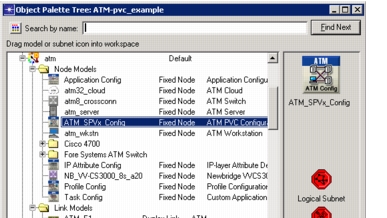
Locate the ATM_SPVx_Config node in the network model, or add it from the object palette if it is not already there.
Figure 91: SPVx_Config Node
-
Add a route definition.
2.1 Double-click on the SPVx_Config node to Edit Attributes.
2.2 Expand Preferred DTL Configuration.
2.3 Add a route definition.
**Figure 92: Add a Route Definition** 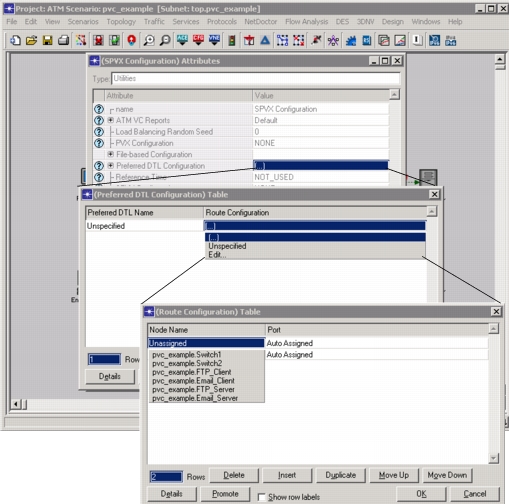 Each preferred route is identified globally by its name and is defined by a sequence of node/port pairs. The port specification is optional in each pair. Once a route is defined here, multiple circuits can be configured to take that route.2.4 Click OK to apply the changes to the Preferred Routes.
-
Add the preferred route to an SPVC or SPVP.
3.1 Right-click on the SPVC or SPVP and select Edit Attributes.
3.2 Expand the Preferred Routes attributes.
3.3 Expand the sub-attribute Path Configuration to specify a list of one or more preferred routes for a circuit. The available choices will include all of the DTLs that you specified on the ATM_SPVx_Config node.
You can optionally assign a priority to each route you select . When selecting a route for the PVC, the route with the highest priority that can accommodate the circuit will be chosen.3.4 Configure Behavior on Failure to specify what you want the software to do if none of the preferred routes are feasible for the circuit (e.g., if the circuit is rejected by the specified switches during routing). You can choose Fail Connection or Use Dynamic Routing Protocol, which will let the dynamic routing protocol to choose a route for the circuit which satisfies the routing constraints.
3.5 Click OK to apply the setting.
-
Click OK to close the Edit Attributes window.
End of Procedure 17