Configuring a Sequence of Stitched PVC/PVPs
The ATM model lets you configure a sequence of stitched PVCs or a sequence of stitched PVPs. A soft PVP and a hard PVP can be stitched at a switch, as can a soft PVC and a hard PVC. However, two hard PVCs cannot be stitched and neither can two hard PVCs. Any sequence of stitched PVCs or PVPs has to be stitched in an alternating order of hard/soft, as shown in Figure 89.
Figure 89: Stitched PVx Configuration
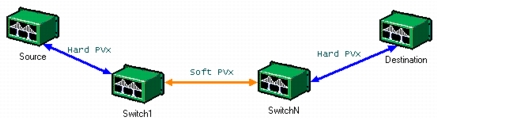
Note: A PVP cannot be stitched to a PVC.
Stitching PVCs
When two PVCs are stitched at a node, all ATM cells coming in on one of the PVCs are forwarded to the other. When PVCs are stitched end-to-end, they appear as a single end-to-end connection to any traffic using these PVCs.
To stitch a hard PVC to a soft PVC use Procedure 12:
Procedure 12: Stitching a Hard PVC to a Soft PVC
-
Configure the two PVCs so they share an end node, using the procedures described earlier in this section.
-
Configure the path of the hard PVC using the PVX Circuit attribute, as described in Procedure 11.
-
Set the Incoming Parameters of the first hop to “Cross-Connect,” if the hard PVC is going to be stitching to the soft PVC at the source.
If the hard PVC is stitching to the soft PVC at the termination, set the Outgoing Parameters of the last hop to "Cross-Connect.”
-
Determine the VPI/VCI of the first hop of the hard PVC at the switch on which the stitching is to be configured.
If the hard PVC is stitching at its source, the VPI/VCI will be those in the Outgoing Parameters of the first hop of the hard PVC. If the hard PVC is stitching at its termination, the VPI/VCI will be in the Incoming Parameters of the last hop of the hard PVC.
-
Determine if the SPVC is stitching to the PVC at its source or at its destination by viewing the SPVX Endpoints attribute.
-
Set up stitching based on the information gathered in step 5.
- If the SPVC is stitching at its source, configure the VPI/VCI under the SPVX Endpoints > Source Node Configuration to match the values on the hard PVC determined above.
- If it is stitching at its destination, configure the VPI/VCI under SPVX Endpoints.Destination Node Configuration to match these values.
End of Procedure 12
Stitching PVPs
A sequence of PVPs can be stitched to each other and will appear as a single end-to-end virtual ATM trunk to any PVC that can be tunneled through that virtual trunk. To stitch a hard PVP to a soft PVP, use Procedure 13:
Procedure 13: Stitching a Hard PVP to a Soft PVP
-
Install the two PVPs so they share an end node, using the procedures described earlier in this section.
Note: The procedures of installing soft/hard PVPs are the same as those described for soft/hard PVCs, except that the atm_spvp connection object should be used in the case of soft PVPs and the atm_hpvp object should be used in the case of hard PVPs.
-
Configure the path of the hard PVP using the attribute PVX Circuit, as described in Procedure 11.
-
Set the Incoming Parameters of the first hop to “Cross-Connect,” if the hard PVP is going to be stitching to the soft PVP at the source.
If the hard PVP is stitching to the soft PVP at the termination, set the Outgoing Parameters of the last hop to "Cross-Connect.”
-
Determine the VPI of the first hop of the hard PVP at the switch on which the stitching is to be configured.
If the hard PVP is stitching at its source, the VPI is that in the Outgoing Parameters of the first hop of the hard PVP. If the hard PVP is stitching at its termination, the VPI is that in the Incoming Parameters of the last hop of the hard PVP.
-
Determine if the SPVP is stitching to the PVP at its source or at its destination by viewing the PVP Endpoints attribute.
- If the SPVP is stitching at its source, configure the VPI under Ingress Parameters to match the VPI value on the hard PVP determined above.
- If it is stitching at its destination, configure the VPI under Egress Parameters to match this value.
End of Procedure 13