Mapping an ATM Connection to an IP Interface
When connecting a circuit to an IP node, you must explicitly map the ATM connection to an IP interface to ensure a valid configuration. This ensures that the IP layer will treat the ATM connection as a single point-to-point Layer-2 connection and will send IP traffic over the connection. The connection can consist of either a single circuit or a sequence of stitched circuits. Use Procedure 14 to map the connection to the IP interface.
Procedure 14: Map an ATM Connection to an IP Interface
-
Install the circuit (or the sequence of stitched circuits) using the procedures described earlier in this section.
-
Locate the Interface Information attribute for the interface to which the circuit will map.
Figure 90: Layer-2 Mapping: IP Interface to ATM PVC
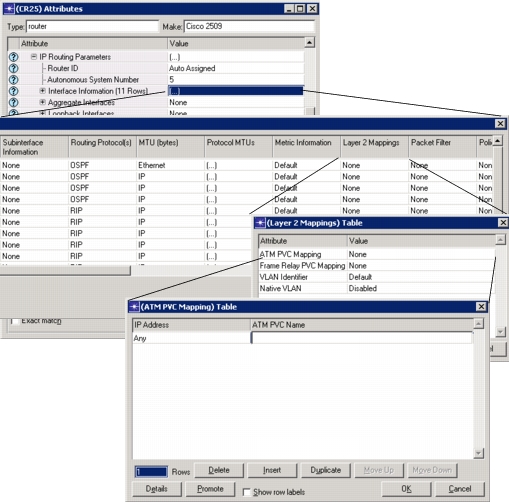
If you know the ATM link that the circuit uses to connect to the IP node, you can find out which IP interface the link corresponds to by right-clicking on it and selecting "Edit Ports." Notice that a circuit can be mapped to any of the following types of IP interfaces:
- IP interface
- IP subinterface
- Aggregate IP interface (if the circuit uses an IMA trunk group)
-
Configure the Layer-2 mapping of the IP interface to the PVC.
End of Procedure 14