SPVx Attributes
Some of the important model attributes relevant to modeling ATM connections in discrete event simulation are described in this section.
-
Traffic Characteristics. This attribute maps different IP traffic flows—based on type of service, destination address, and so on—to different ATM connections (SPVX, SVC), assigning each flow with a specific traffic contract. This allows you to set up ATM connections to handle different types of traffic and to control the priority assigned to different traffic flows.
-
ATM VC Reports. This attribute exports the various reports to external generic data files.
Figure 80: ATM VC Reports Table
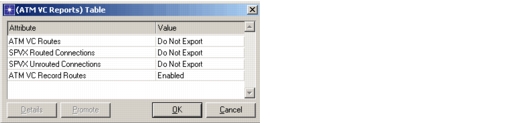
The following reports can be exported in DES:
- The ATM VC routes report, which specified the routes taken by the various VCs in the network. This report is exported to an external GDF file in the following format:
<project_name>-<scenario_name>-vc_routes.gdf. - The SPVX routed connections report, which contains the list of SPVX connections that were routed successfully in the network. This report is exported to an external.GDF file in the following format:
<project_name>-<scenario_name>-atm_vc_routed_connections.gdf. - The SPVX unrouted connections report, which lists the SPVX connections that failed to get routed. This report is exported to an external GDF file in the following format:
<project_name>-<scenario_name>-atm_vc_unrouted_connections.gdf. - The ATM VC record routes option, which records the routes taken by all connections in the network when set to enabled. You can view these routes by using the route browser after running the simulation. To view the routes, go to Protocols > ATM > Display ATM VC Routes.
- The ATM VC routes report, which specified the routes taken by the various VCs in the network. This report is exported to an external GDF file in the following format:
-
SPVX Start Time Jitter. This attribute allows you to configure a jitter to the start time of the SPVX connections. As a result, all the SPVX connections are spread uniformly across the spread interval that you specify.
-
ATM VC Routes Export. This attribute is found only on end nodes, such as a source node, a destination node, a server, a workstation, or a simulation attribute. When set on a per node basis, routes taken by all calls originating from that node will be exported to a .GDF file. When set on a global basis using the simulation attribute, routes taken by all calls in the network will be exported to a .GDF file
Setting this attribute to Export prints out all routes taken. The resulting file has the following name format:
<project>-<scenario>-pnni_routes.gdf.