Soft PVC Configuration
Soft PVCs are configured using the atm_spvx connection object, which is used to draw a connection between two points in the network model. To configure the PVC, set the attributes on the connection object, as shown in Figure 83.
Figure 83: Configuring a Soft PVC
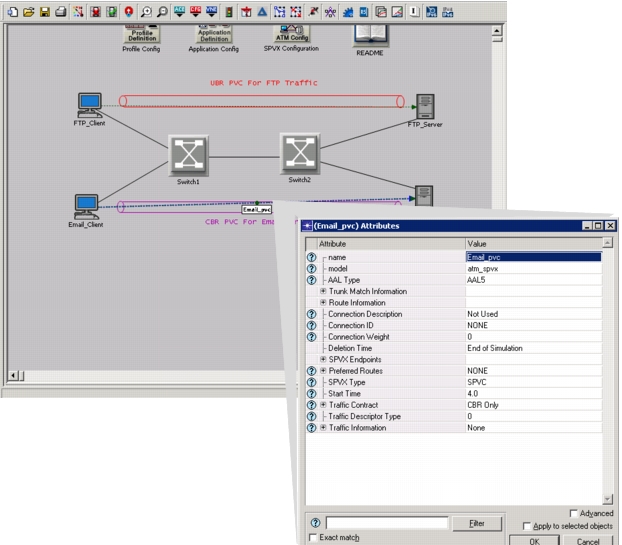
To configure a soft PVC in the network, use Procedure 10.
Procedure 10: Configuring a Soft PVC Using the atm_spvx Connection Object
-
Open the object palette.
-
Select the Demand model atm_spvx. Drag it into the project editor.
-
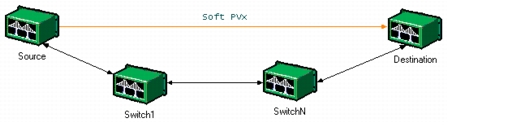
Draw the connection between the two end nodes.
Note: If the nodes are IP nodes, map the circuit to an IP interface. See Mapping an ATM Connection to an IP Interface.
Figure 84: Soft PVx Configuration
-
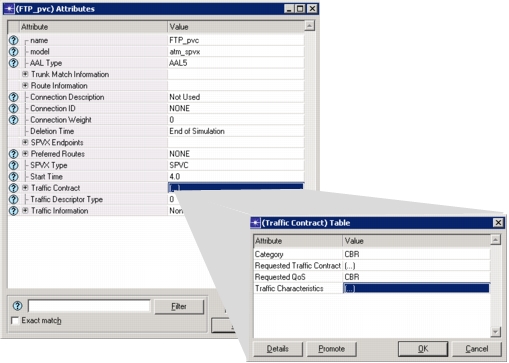
Set the traffic contract of the PVC.
Note: By default, the PVC is a UBR PVC and will reserve no bandwidth.
Figure 85: Setting the Traffic Contract
-
Click OK to save changes and close the dialog box.
End of Procedure 10