Shortest Path Tree (SPT) Switchover
After the first packet for a group is received by a router closest to the receiver, that router can initialize the switch to the shortest path tree. This is the default behavior in Riverbed Modeler and on most production systems. The switch might also be initiated later if the traffic for the group reaches a configurable threshold. This is controlled by the PIM Parameters > SPT Threshold Configuration attribute. This attribute lets you set an interval over which the router checks to see if the threshold is being exceeded.
Configuration
Figure 234: SPT Threshold Configuration Attribute Dialog Box

Note: In discrete event simulation, only explicit traffic counts towards the threshold being exceeded. Background traffic (demands) do not contribute towards the threshold calculation.
If discrete traffic is used, you can look at the link throughput to see the effect of the switchover. This is illustrated in the Multicast SPT scenario of the IP_Multicast example project.
Viewing Demands
For multicast demands, you can visualize ST and SPT paths in both flow analysis and discrete event simulation as described in Visualizing the Multicast Tree.
Log Messages
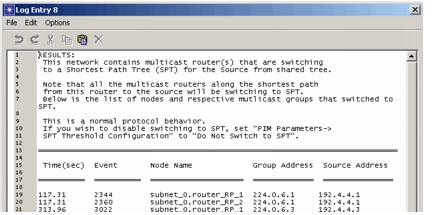
Discrete event simulation also writes a composite log message listing the groups that switched to the SPT. If any groups switched to SPTs, a log message is generated similar to the one shown in the following figure.
Figure 235: Switching to SPT Log Message