RP Visualization
Flow analysis lets you view the RP used for a particular group.
Procedure 50: Visualizing RP Configuration
-
If there is no multicast demand created for the group, create one on any host/router. Use Procedure 54.
-
Run flow analysis.
-
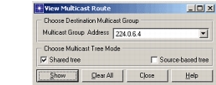
Select the source node and select the Flow Analysis > Show Multicast Routes from Selected Node… menu option. This will display the following dialog box:
-
Select the desired multicast group address, check “Shared tree” checkbox, and click on “Show”.
-
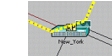
ST path will be highlighted and an icon will be placed over the RP used for the selected group.
End of Procedure 50