Anycast RP and MSDP
You can use Anycast RP and the Multicast Source Discovery Protocol (MSDP) to enhance IP multicasting in your network models. These protocols add the following capabilities:
- two or more RPs for a multicast group
- RP failover
- RP load balancing
- multicast across domains
An example network using Anycast RP is available in the Anycast_RP_with_MSDP scenario of the IP_Multicast example network.
Implementation
The MSDP model in Modeler contains a set of attributes corresponding to the MSDP parameters that can be imported from router configuration files. The MSDP model uses a subset of these attributes to implement Anycast RP, as listed in Table 116.
Table 116: Attributes Used for Anycast RP
| Attribute Group | Attribute | Sub-Attribute |
|---|---|---|
| IP Multicasting > MSDP Parameters | Status | |
| Local Address | ||
| Peer Configuration [compound] | Hostname/Address | |
| Status | ||
| Local Interface/Address | ||
| Mesh Group | ||
| Cache SA State | ||
| Active Source Limit | ||
| Active Source Threshold | ||
| SA Encapsulation | ||
| Timers [compound] | Connect Retry Timer | |
| Keep Alive Message Period | ||
| Peer Hold Timer | ||
| SA Cache Timer | ||
| Source Timer | ||
| IP Multicasting > PIM Parameters > Processes > Process Parameters | Load Balancing | |
| Reports | MSDP Registered Multicast Sources |
Configuration
Note: If your network model is based on imported configuration files from a network that uses Anycast RP and you haven't changed any attributes, your model is already configured appropriately.
To configure Anycast RP on a network model manually, follow this procedure.
Procedure 51: Configuring Anycast RP
- For each router that will be an RP:
- Open the Attributes dialog box.
- Open the IP > IP Routing Parameters > Loopback Interfaces compound attribute, add two rows, and set the following sub-attributes:
- Set Name so that the interfaces have different names.
- Set Address on the first interface to the Anycast RP unicast address. (This is simply an address that multiple RPs in the scenario will share and can be any valid unicast address—in other words, this will be the "anycast" address of the RPs.)
- Set Address on the second interface to a unique unicast address. (This will serve as the RP's "Local Address" in MSDP.)
- Make sure routes to the new Loopback addresses will be advertised to the network (use the Protocols > IP > Routing > Configure Routing Protocols on Loopback Interfaces... menu or some other method).
- Set the IP Multicasting > MSDP Parameters > Status attribute to Enabled.
- Set the IP Multicasting > MSDP Parameters > Local Address attribute to the address configured on the second Loopback interface (in step 1.2).
- Open the IP Multicasting > MSDP Parameters > Peer Configuration compound attribute, add a row for each MSDP Peer of this RP, and set the following sub-attributes on each:
- Set Hostname/Address to match the Local Address configured on the peer.
- Set Status to Enabled.
- Specify the Anycast RP unicast address on the routers that will support multicast in the relevant groups (use one of the procedures given under Configuration).
End of Procedure 51
Statistics
You can collect statistics during a discrete event simulation to help analyze Anycast RP operation. Fig 2-6 shows the promoted MSDP statistics available for collection.
Figure 222: MSDP Node Statistics
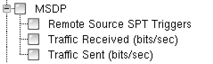
There are additional statistics defined for MSDP and PIM-SM that might be of interest when using Anycast RP. To collect them, you can promote them in the node model.
Table 117: Unpromoted Statistics
| MSDP.Traffic Sent (packets/sec) | PIM-SM (Per Group).PIM-SM Joins Received (packets/sec) |
| MSDP.Traffic Received (packets/sec) | PIM-SM (Per Group).PIM-SM Joins Sent (packets/sec) |
| MSDP.Traffic Sent per Peer (packets/sec) | PIM-SM (Per Group).PIM-SM Prunes Received (packets/sec) |
| MSDP.Traffic Sent per Peer (bits/sec) | PIM-SM (Per Group).PIM-SM Prunes Sent (packets/sec) |
| MSDP.Traffic Received per Peer (packets/sec) | PIM-SM (Per Group).PIM-SM Register Messages Received (packets/sec) |
| MSDP.Traffic Received per Peer (bits/sec) | PIM-SM (Per Group).PIM-SM Register Messages Sent (packets/sec) |
| MSDP.SAs Originated (packets/sec) | PIM-SM (Per Group).PIM-SM Register-Stop Messages Received (packets/sec) |
| MSDP.SAs Received (packets/sec) | PIM-SM (Per Group).PIM-SM Register-Stop Messages Sent (packets/sec) |
| PIM-SM (Per Group).Receiver SPT Triggers | |
| PIM-SM (Per Group).Remote Source SPT Triggers |
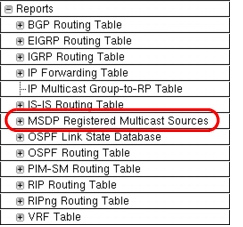
You can also enable a report in a node's attributes that will export the multicast sources registered with MSDP on that node.
Figure 223: MDSP Report