Displaying Cockpit Displays
3D Network Visualizer can display cockpit displays created with GL Studio. It includes cockpits for fixed-wing, rotary-wing, and ground vehicle entities. As with other entity effects, cockpits have schemas and model definitions that you map to entity types. For details about cockpit display models, please see “Adding New Cockpit Display Models“ on page 339.
Note: Cockpits are displayed only when the observer is attached to an entity in mimic mode.
Procedure 82: Displaying Cockpits
-
Choose Settings > Display. The Display Settings dialog box opens.
-
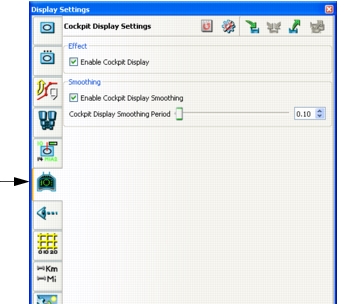
Select the Cockpit Display Settings page (Figure 71).
Figure 71: Cockpit display settings
-
To enable or disable cockpit displays, select or clear the Enable Cockpit Display checkbox
-
Attach the observer to an entity in mimic mode.
Note: You can also enable and disable cockpit displays by choosing Settings > Cockpit Displays or by clicking the Cockpit Displays icon (
) on the Display Settings Toolbar.