Inset Views
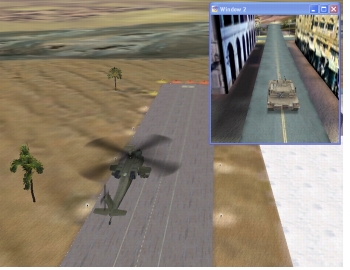
You can display inset views of individual entities. Figure 60 shows a helicopter hovering over the runway in the Makland terrain with an inset view of an M1A2 tank driving through the town.
Figure 60: Inset view
Note: By default, when you create an inset view, the observer in the inset view is attached to the entity in Mimic mode. This has the side effect of causing the model in the main window to disappear. (The reverse occurs if you attach the observer in the main window to the entity in Mimic mode.) To make the model reappear, select the inset view and change the attach mode or detach the observer.
You can change the observer position and orientation in an inset view using keyboard controls. You can also edit window and channel properties for the window in the Display Engine Configuration Editor.
Procedure 71: Opening an Inset View of an Entity
- Right-click the entity (or its entry in the Objects List Panel). A menu opens.
- On the menu, choose Create Inset View.