Displaying Entity Labels
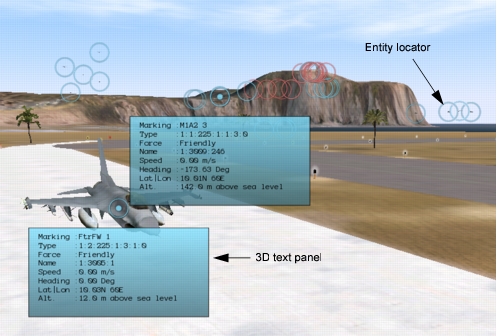
For 3D models, 3D Network Visualizer displays entity labels that help you locate and identify entities (Figure 58). The entity label consists of an entity locator circle, which is always visible when entity labels are enabled, and a text label that is displayed when you mouse over an entity. All entities within the view have locator circles, whether the model is visible or not. The color of an entity’s label represents its force – blue for friendly, red for opposing, and green for neutral.
A 3D text label displays the entity’s:
- Marking text
- Entity type enumeration
- Force
- Name
- Speed
- Heading
- Latitude and longitude
- Altitude
Figure 58: Entity labels
Displaying Text Labels
To view a 3D text label, use one of the following methods:
- Move the cursor over the circle that represents the entity.
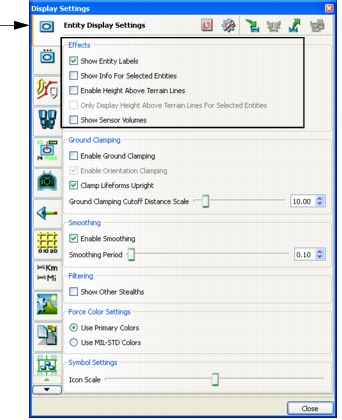
- On the Display Settings dialog box, Entity Display Settings page, select Only Display Labels for Selected Entities (Figure 59). Then select the entity whose label you want to see.
Figure 59: Display Settings, Entity Display Settings page
Turning Entity Labels On and Off
Procedure 69: Turning the Display of Entity Labels On or Off
- Choose Settings > Display. The Display Settings dialog box opens.
- Select the Entity Display Settings page (Figure 59).
- Select or clear the Show Entity Labels checkbox.
Note: You can also enable and disable entity labels by choosing Settings > Entity Labels or by clicking the Entity Labels icon (
) on the Display Settings Toolbar.
Pinning 3D Text Labels to the Window
You can pin 3D text labels to the window, making them stay visible after you move the cursor away from the entity.
Procedure 70: Pinning a 3D Text Label to the Window or Hiding a Pinned Label
- Right-click the entity’s locator circle. A menu is displayed.
- Choose Toggle Pinned Label.
Pinning Multiple 3D Text Labels
You can display multiple labels at one time.
To pin multiple labels, use either of the following methods:
- Right-click and choose Toggle Pinned Label for each entity whose label you want to pin.
- On the Display Settings dialog box, Entity Display Settings page, select Only Display Labels for Selected Entities (Figure 59). Then, in the Objects List Panel, multi-select the entities whose labels you want to see.