Configuring Dynamic LSPs
The model suite includes two LSP models: a static LSP model and a dynamic LSP model. The dynamic LSP can be configured with explicit or Constraint-based Shortest Path First (CSPF) routes. At the beginning of the simulation, all dynamic LSPs are signalled using Resource Reservation Protocol (RSVP) or Constraint-based Label Distribution Protocol (CR-LDP). Static LSPs are not signalled.
Dynamic LSPs with Explicit Routes
When configuring a dynamic LSP with explicit routes, you need to click on each individual router along the route of the LSP to define the path taken by the LSP.
Procedure 78: Creating Dynamic LSPs with Explicit Routes
-
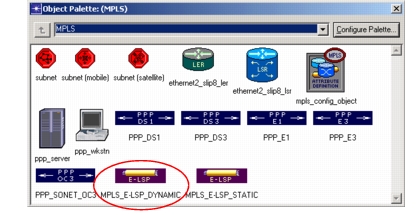
Click on the MPLS_E-LSP_DYNAMIC object in the MPLS object palette.
Figure 385: Dynamic LSP in the Object Palette
-
In the project workspace, click on the ingress Label Edge Router (LER) of the LSP.
-
Click on each router along the LSP’s route. Be sure to click on the objects in the same order that they occur in the LSP.
-
Click on the egress LER of the LSP.
-
Double-click in the project workspace to finish drawing the LSP.
-
Draw additional LSPs, if desired.
-
Exit path definition mode by right-clicking in the project workspace and selecting Abort Path Definition.
-
Select Protocols > MPLS > Update LSP Details.
End of Procedure 78
Dynamic LSPs with CSPF Routes
Dynamic LSPs with CSPF routes must use a routing protocol based on the SPF algorithm. Specifically, you must select OSPF or IS-IS as a routing protocol.
The simulation engines might compute different CSPF routes for dynamic LSPs depending on the order in which the LSPs are considered by the algorithm. By default, the LSPs are routed in the order in which they were created in the network model. You can make flow analysis consider the LSPs in a random order by setting the Random Seed for LSPs Ordering preference (Edit > Preferences) to a positive number.
Because of the effect that ordering has on the computed routes, the performance of a CSPF-based network can vary considerably from one sequence (ordering) to another. If you are comparing the results from simulation with a real network, you may also see routing differences between the model results and the results from the production network.
Procedure 79: Creating Dynamic LSPs Without Explicit Routes
-
Click on the MPLS_E-LSP_DYNAMIC object in the MPLS object palette.
-
In the project workspace, click on the LSP’s ingress LER.
-
(Optional) If the LSP must use certain routers or links, click on the intermediate routers or links that must be used. Be sure to click on the objects in the same order that they occur in the LSP.
-
Click on the LSP’s egress LER.
-
Double-click in the project workspace to finish drawing the LSP.
-
Draw additional LSPs, if desired.
-
Exit path definition mode by right-clicking in the project workspace and selecting Abort Path Definition.
-
Select Protocols > MPLS > Update LSP Details.
End of Procedure 79