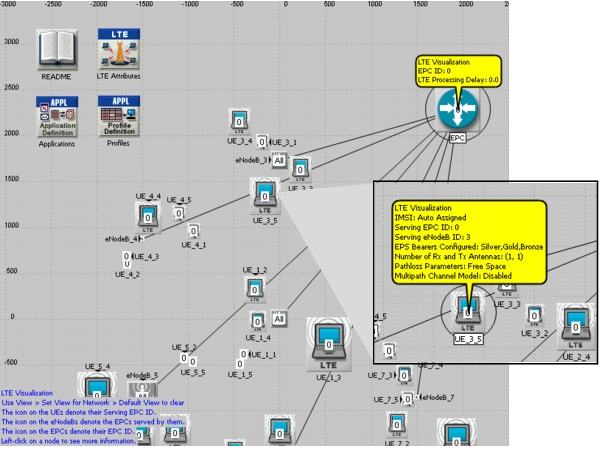
Visualizing LTE in the Project Editor
A network view is a predefined set of visualization settings. You can apply a network view to reduce visual clutter and to highlight information of interest in your model.To visualize LTE information in your network, choose one of the following menu options:
- View > Set View for Subnet > LTE (sets view for this subnet only)
- View > Set View for Network > LTE (sets view for all subnets)
Note: To use this feature, be sure the "Enable Balloons" preference is set to TRUE.
Either action will place an icon on UEs that denote their Serving EPC ID, an icon on eNodeBs that denote the EPCs served by them, and an icon on the EPCs that denote their EPC ID. This view will also enable balloons on each LTE node that will show a summary of important LTE attributes configured on that node, as shown in the figure below.
Figure 346: LTE Visualization in Network