Configuring Route Maps
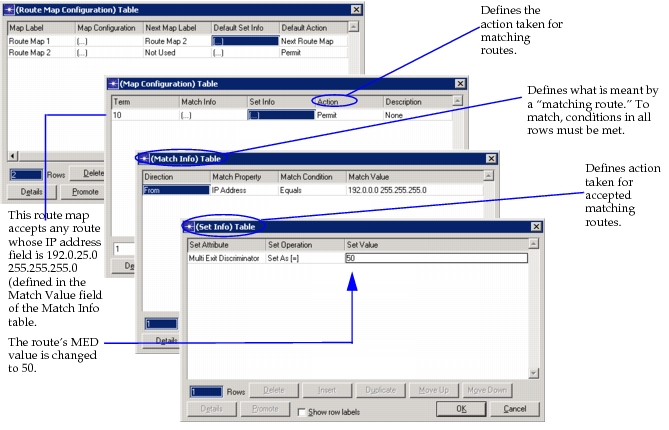
Route maps are used in several IP routing parameters to match and modify routes. Before you can apply a route map in one of these protocols, you must first define it on the router using the route map.
Procedure 38: Defining a Route Map on a Router
-
On a given router, right-click on the device and select Edit Attributes.
-
Edit the IP > IP Routing Parameters > Route Map Configuration attribute and add a row to the table.
-
Enter a name for the route map in the Map Label attribute.
-
Edit the Map Configuration attribute.
-
Add one row for each term of the route map. In each row of the Map Configuration table, specify the following:
- The name of the term in the Term attribute.
- One or more match conditions in the Match Info attribute. See the description of the Match Info attribute for more information.
- Any set statements associated with the term under the Set Info attribute. See the description of the Set Info attribute for more information.
- The action applied to matching routes in the Action attribute.
-
Name the next route map that should be applied by configuring the Next Map Label attribute.
-
Click OK in each dialog box to apply changes and close the dialog boxes.
End of Procedure 38
Figure 180: Defining a Route Map