IP Routing Parameters
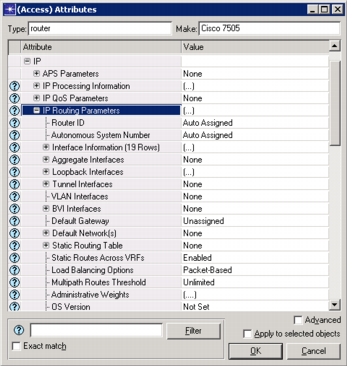
The IP routing attributes are grouped in the IP > IP Routing Parameters attribute found on all routers.
Figure 173: IP Routing Parameters
-
Router ID. This attribute specifies the router ID used by the OSPF routing protocol. Other routing protocols do not use this attribute.
-
Autonomous System Number. This attribute specifies the router’s autonomous system (AS) number. Specifying a value of “Auto Assigned” chooses a number from 1 to 65535, inclusive, during a simulation. This auto-assigned value may not be unique if either of the following is true:
- the network has more than 65535 nodes
- you have manually set some autonomous system numbers
You can quickly assign the same autonomous system to several routers by selecting Configure AS Number for Selected Routers from the Protocols > IP menu.
-
Interface Information. This compound attribute specifies IP routing attributes that apply on a per-interface basis.
-
Status. This attribute specifies if the interface can receive and forward packets. If the status of an interface is set to Shutdown, no packets are received or forwarded on that interface.
-
Address. This attribute specifies this interface’s IP address as one of the following values:
An address — entered in dotted decimal notation
Unnumbered — valid only for OSPF’s Unnumbered Point-to-Point links feature
Auto Assign — automatically chooses a unique address for all interfaces during a simulation
Although you can export auto-assigned values (using the IP Interface Addressing Mode simulation attribute), these addresses are not retained as attribute values.
To automatically populate the Address attribute of all connected interfaces with unique values before a simulation, select Auto-Assign IP Addresses from the Protocols > IP > Addressing menu.
-
Subnet Mask. This address specifies this interface’s subnet mask. You can enter a value in dotted decimal notation, or you can choose one of the pre-configured values. Specifying Auto Assigned chooses a subnet mask value based on the class of the IP address.
-
Subinterface Information. Here you can specify one or more subinterfaces for each physical interface. See Subinterfaces for details on creating subinterfaces.
-
Routing Protocol(s). This attribute specifies the routing protocols used on the interface. You can enable as many of the routing protocols as you wish. By default, this attribute is set to RIP for all interfaces in the network. You can configure all router interfaces to use the same routing protocol(s) by selecting Configure Routing Protocols from the Protocols > IP > Routing menu.
-
MTU. This attribute specifies the MTU (maximum transfer unit) of the interface. The MTU depends on the data link technology used for packet transfer on this interface and should be greater than the size of the IP header.
You can select one of the preconfigured values according to the data link technology used on the interface, or you can select Edit... to manually specify a value in bytes.
-
Metric Information. This attribute specifies values for bandwidth, delay, reliability, and load, which are used to compute the interface cost.
-
QoS Information. This attribute specifies Quality of Service (QoS) related parameters for this interface. The default value is None, which means that QoS is not modeled. Change this setting if you want to analyze the effects of Quality of Service.
-
Multicast Mode. This attribute specifies if IP multicasting is enabled or disabled on this interface. By default, multicasting is disabled. You should set this attribute to Enabled on all interfaces that send, receive, or forward multicast packets. For additional information on IP multicasting, see “IP Multicast”.
-
Layer 2 Mapping. This attribute enables you to specify an ATM or Frame Relay PVC connected to this physical interface. Here you can also list the VLANs and ELANs to which this interface belongs.
Subinterfaces must have their VLANs or ELANs specified under the IP > IP Routing Parameters > Subinterface Information > Layer 2 Mapping attribute.
-
Packet Filter. Here you can configure extended ACLs to filter IP packets being received and sent from this interface.
-
Policy Routing. Here you can configure a route map to be used to policy route all data arriving on this interface.
-
VRF Name. Here you can specify a VRF name to be associated with the interface when configured for BGP/MPLS VPNs. If an interface is connected to a VPN-site CE, then this attribute should be set to the VRF name associated with that VPN site. On receiving a packet on this interface, the routing process on this node looks up the VRF specified for this interface.
-
Compression Information. This attribute specifies the compression scheme used on this interface. The compression schemes listed on the pull-down menu are those that have been defined in the IP compression Information attribute of the IP Attribute Definition object. If none of the preconfigured schemes are suitable, you should first define your own scheme in the IP Attribute Definition object (from the utilities object palette). Once defined, your new scheme will appear in this attribute’s (IP > IP Routing Parameters > Interface Information > Compression Information) pull-down menu.
-
Description. Here you can write an optional description of the interface.
-
-
Aggregate Interfaces. Allows the configuration of aggregate interfaces. An aggregate interface consists of multiple physical interfaces bundled together into a single logical interface.
-
Loopback Interfaces. This attribute specifies the address and routing protocol information of this router’s loopback interfaces.
-
Tunnel Interfaces. Specifies the configuration of tunnel interfaces.
-
VLAN Interfaces. Specifies the configuration of virtual LAN interfaces.
-
BVI Interfaces. Specifies the configuration of Bridged Virtual LAN interfaces parameters.
-
Default Gateway. Specifies the gateway of last resort. To configure a gateway of last resort, use either the “Default Network(s)” attribute or configure a static route to 0.0.0.0/0.
-
Default Network(s). Provides a way to configure the gateway of last resort. For every network specified here, the route to that network, if a router has a route to it, is flagged as a candidate default route.
-
Default Route. This attribute specifies the interface address that IP datagrams are sent to when IP routing is disabled and route table lookup does not yield a route.
-
Static Routing Table. This attribute specifies static routing information. A static route is used if no dynamic routing protocols are selected for an interface (that is, if all routing protocols are set to Disabled), or if the specified static route has higher priority (lower administrative weight) than the dynamic routing protocols.
-
Load Balancing Options. This attribute specifies if load balancing for multi-path routes is done on a per-packet or per-destination basis.
-
Multipath Routes Threshold. This attribute specifies the maximum number of routes that are considered by the routing table if there are multiple routes to the same destination.
-
Administrative Weights. This attribute specifies a routing protocol priority system for traffic forwarded by the router. Protocols with a lower administrative weight have higher priority than those with higher administrative weight. The default scheme implements the following priority system:
BGP (ext.) > EIGRP (int.) > IGRP > OSPF > RIP > EIGRP (ext.) > BGP (int.)
-
Extended ACL Configuration. Configures extended access control lists, which are used to filter packets and as match conditions in route maps.
-
Prefix Filter Configuration. Configures prefix filters, which are used to filter routes and as match conditions in route maps.
-
Route Map Configuration. Configures the route maps used in this router. Route maps are general constructs used to control and manipulate IP route information or IP packets. Currently, two protocol models use route maps: EIGRP and BGP. The BGP model uses route maps to apply routing policies and both models use route maps to configure redistributed routes.
Route maps are a collection of terms, where each term specifies match information, optional set information, and the action performed on matching routes. A route that does not match any of the terms of a route map is implicitly denied by the route map.
-
Map Label. Specifies a name for the route map. On a given router, each route map should have a unique label. However, you can reuse a label name for route maps of a different router.
-
Map Configuration. Configures the route map as a collection of terms, where each row of the Map Configuration table corresponds to a term of the route map.
Match Info. Specifies the properties a route must satisfy to match the term. Each row in the Match Info table defines a separate condition the route must satisfy to match the route map—all conditions must be satisfied for a match. Search the Support website (support.riverbed.com) for “Supported Vendor Devices and Commands”.
Set Info. Specifies modifications applied to the attributes of any routes matching the conditions of the Match Info attribute. The set actions are applied in the order specified in the Set Info Table.
Action. Specifies what happens to routes satisfying the match conditions:
Permit—accepts the route with no further action
Deny—rejects the route with no further action
Next Term—considers the next term in the list
Next Route Map—considers the next route map without considering any of the remaining terms
-
Next Map Label. Specifies the next route map to be applied to any matching route. If no other route maps should be applied, set this attribute to Not Used.
-