Configuring Routing Protocols
The IP protocol relies on a suite of support protocols that help it accomplish its task of moving datagrams from source to destination addresses. One example of a supporting function is route determination.
As with actual networks, a variety of routing protocols are available in the model library. These protocols can be used homogeneously throughout the network, or in combination with each other. This section does not elaborate on how to make choices about which routing protocol to use since this is an in-depth topic of network design, and not one of network modeling. However, if the specific routing protocol(s) used by your actual network are not available in the standard model library at this time, you need to consider which of the available protocols represent the best match. This table of routing protocol features may be helpful in making such a selection:
Table 102: Routing Protocols
| Routing Protocol | Characteristic Features |
|---|---|
| RIP | • Distance Vector Based • Runs over UDP • Typically interior gateway protocol • Only one path to each destination. No load balancing • Hop-count based costing |
| OSPF | • Link State Based • Runs directly over IP • Interior or border gateway protocol • Multiple paths to each destination. Load balancing • Link-attribute based costing. Costing is statically assigned |
| IGRP | • Distance Vector Based • Typically interior gateway protocol • Multiple paths to each destination. Load balancing • Link-attribute based costing. Dynamic costing |
| EIGRP | • Distance Vector Based • Typically interior gateway protocol |
| IS-IS | • Link State Based • Typically interior gateway protocol • Runs parallel to IP |
| BGP4 | • Link State Based • Runs over TCP • Border gateway protocol • Multiple paths to each destination. Load balancing • Link-attribute based costing. Costing is statically assigned |
There are three ways to configure router interfaces to use a particular set of routing protocols in your network model:
- Use the Protocols > IP > Routing > Configure Routing Protocols menu operation
- Modify the IP > IP Routing Parameters > Interface Information > Routing Protocols attribute
- Use the IP Dynamic Routing Protocol simulation attribute in the Configure/Run Discrete Event Simulation dialog box
Table 103: Methods for Designating a Routing Protocol
| Method | Characteristics | When to Use |
|---|---|---|
| Configure Routing Protocols menu operation | Any number of interfaces can be configured at the same time Overwrites the IP Routing Parameters > Interface Information > Routing Parameters attribute Multiple routing protocols can be specified |
In most cases, this is your first choice |
| Manual attribute configuration | Only one interface can be configured at a time | You want to add a protocol to those already designated on a particular interface |
| IP Dynamic Routing Protocol simulation attribute | Does not modify router attributes Overrides the routing protocols configured on the router interfaces for the duration of the simulation One routing protocol used on all interfaces When this attribute is set to "Default," the protocols specified on the router interfaces are used. |
You have configured the routing protocols in your network but want to see the effects of running a single protocol throughout the network. |
The easiest way to designate routing protocols is the Configure Routing Protocols menu operation. This operation has the same effect as manually setting the interface routing protocol attributes, but with the added advantage of being able to configure multiple interfaces at the same time. Before using this operation, you should first determine exactly which routing protocols you want to specify on the interfaces. This is important because each time you use this operation, it overwrites the previous setting on the interface.
Procedure 37: Designating Routing Protocols on Interfaces
-
Select the links attached to the interfaces you want to configure. If all physical and loopback interfaces in the network are running the same set of routing protocols, skip this step.
-
Choose Protocols > IP > Routing > Configure Routing Protocols.
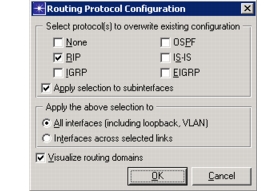
The Routing Protocol Configuration dialog box appears.
Figure 179: Routing Protocol Configuration Dialog Box
-
Select the routing protocols.
-
Clear the "Apply selection to subinterfaces" checkbox if you do not want to change the routing protocol configuration on any subinterfaces. (This box is selected by default.)
-
Specify the interfaces to be configured:
- If you selected interfaces in the first step, select "Interfaces across selected links."
- If you want to apply this configuration to all connected interfaces in the network, select "All interfaces (including loopback)".
-
Click OK.
The Routing Protocol(s) attribute on specified interfaces are configured. Unless you unchecked the Visualize routing domains checkbox, the protocol configurations are also shown in the workspace.
End of Procedure 37