Wireless Communication Basics
In general, you build a wireless network just as you do one based on fixed sites and wired links. However, because wireless models rely on a broadcast medium and wireless nodes and subnets can move during a simulation, there are additional things to consider when creating wireless networks, including:
Radio Link Issues
Like bus links, radio links transmit packets by broadcasting them. Therefore, packets are replicated for each selected destination to allow them to be evaluated and modified independently. Unlike point-to-point links, radio links are not statically represented; that is, you cannot see them in your network model. Instead, radio links are dynamically established during simulation. Radio links can exist between any radio transmitter–receiver channel pair, but establishing a link depends on many physical characteristics of the components involved, as well as time-varying parameters. During simulation, parameters such as frequency band, modulation type, transmitter power, and (in the case of moving objects) distance and antenna directionality are common factors that determine whether a radio link exists at a particular time or can ever exist.
For example:
- Radio links use the distances between nodes to compute link effects such as propagation delay, interference, and received power levels.
- Radio links dynamically determine errors based on parameters of the transmission that affect link quality, such as interference and signal strength.
Connectivity
Because radio is a broadcast technology and depends on dynamically changing parameters, the Transceiver Pipeline must evaluate the possible connectivity between a transmitter channel and every receiver channel for each transmission. The network level characteristics factored into the default Transceiver Pipeline calculations are the source and destination nodes’ locations, the distance between the nodes, and the direction the radio signal travels from the source node to the destination node. If the nodes are mobile nodes or satellite nodes, these position-related parameters might change during simulation.
Site Position
The locations of the nodes are significant factors in a radio link because the default Transceiver Pipeline computes whether the source node has direct line-of-sight to the destination node. Line-of-sight depends on where the nodes are positioned relative to the earth. If the earth’s surface is between the two nodes, then the nodes are said to be occluded and the link computation is discontinued. If the earth or some other object is not between the two nodes, then link closure exists and the link computation continues.
Figure 1: Default Model of Occlusion by the Earth’s Surface
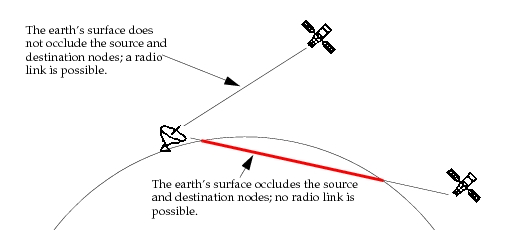
The distance between the nodes determines the propagation delay and path loss of the radio signal. The default Transceiver Pipeline computes the propagation delay of the radio signal traveling from the source node to the destination node at the speed of light. The Transceiver Pipeline also models the weakening of the radio signal as it propagates from the source node. It is assumed that the path loss is directly related to the reciprocal of the distance squared.
Antenna Pattern
As a packet is sent from a radio transmitter or received by a radio receiver, the power of the radio signal can be influenced by antennas. With most antennas, the signal level is higher in some directions than in others. Taking this into account, the default Transceiver Pipeline determines the direction in which the radio signal travels from the source node to the destination node. As the signal radiates from the transmitter, the Transceiver Pipeline calculates the signal power out of the antenna in that direction. When the radio signal reaches the destination node, the Transceiver Pipeline also calculates the direction of the signal into the receiver’s antenna (if there is one). The antenna can increase or decrease the received signal based on its gain in the incoming direction of the radio signal. As with the transmitter, if a receiver does not have an antenna object attached to it, the signal level is not adjusted.
For details about how antenna patterns are modeled in Modeler, see “Antenna Pattern” on page 58.
Simulation Efficiency
As indicated in the preceding sections, wireless network simulations involve large number of calculations. For example, simulations must:
- Test every possible transmitter-receiver combination for each transmitted packet
- Frequently recompute the positions of mobile sites
For these reasons, wireless simulations can be very time-consuming. The Wireless functionality supplies various methods of mitigating this time requirement, as listed in the following table. (Riverbed Modeler users should refer to Table 3 for additional efficiency techniques.)
Table 1: Reducing Wireless Simulation Time
| To… | Refer to… |
|---|---|
| Execute pipeline stages in parallel | Product documentation for information about using multiple processors and the parallel simulation kernel “Parallel Simulation” on page 67 for details about using parallel simulation in wireless models |
| Reduce the number of pipeline calculations | Wireless Domains |
| Reduce the number of site position calculations | Reducing the Number of Position Calculations |
| Duplicate packets for only those receivers that can receive them | “radio_transmission_defer_packet_duplication” on page 209 |