Displaying DDS Textures Correctly
DDS is a DirectX bitmap format that is often used for textures. DirectX expects the origin of the image to be at the top left corner. OpenGL expects the image origin to be at the bottom left cornet. By default, 3D Network Visualizer automatically flips DDS images to the openGL orientation. However, sometimes people pre-flip these images for use in OpenGL applications (like 3D Network Visualizer) and therefore you may have to tell 3D Network Visualizer to not flip them.
You can change the DDS textures setting as follows:
- On a per-model basis. (For details, please see “Flipping DDS Textures for a Model“ on page 341.)
- When you add a terrain patch. (For details, please see Adding Elevation Data (Terrain Patches) to a Terrain.)
- As a global setting. (For details, please see Flipping DDS Textures Globally.)
Flipping DDS Textures Globally
You can specify the DDS textures setting to apply to all terrains. This setting is primarily beneficial for paged terrains because you cannot know ahead of time if textures need to be flipped, as you could for a model or terrain patch. If a paged terrain has DDS textures that are upside down relative to 3D Network Visualizer’s expectations, the textures can be flipped when the terrain gets paged in.
Procedure 51: Enabling or Disabling DDS Texture Flipping for all Terrains
-
Choose Settings > Display. The Display Settings dialog box opens.
-
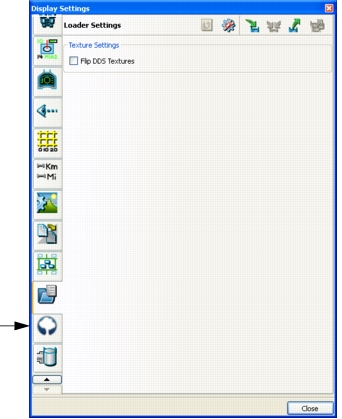
Select the Loader Settings page (Figure 77).
Figure 77: Loader Settings page
-
Select the Flip DDS Textures checkbox.
-
Click Close.