Adding a Feature Layer
A feature layer is a file that contains source data from which you can add props to a terrain. A feature layer can be a MÄK Terrain Format (GDB) file, a shapefile (SHP), or DFAD data (DFD).
Note: Adding a feature layer does not, by itself, make any visible difference to a terrain. To take advantage of the feature data, you must extract the data as props and map the props to model definitions. For details, please see Adding Props to a Terrain.
Note: The number of layers you can add depends on your graphics card. If you add a layer and it does not appear, try reducing the number of layers you have.
Procedure 35: Adding a Feature Layer
-
Choose Settings > Terrain.
The Terrain Settings dialog box opens.
-
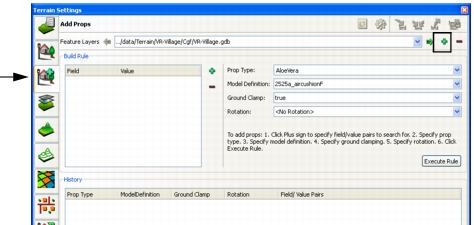
Select the Add Props page (Figure 61).
Figure 61: Add Props page
-
Click the Add icon (
 ) to the right of the Feature Layers list.
The Select Source File for Feature Layer dialog box opens.
-
In the Select Source File for Feature Layer dialog box, select the file that you want to use for this feature layer.
-
Click Open.
The source file is added to the list of feature layers.