Polar (Radial) Plot
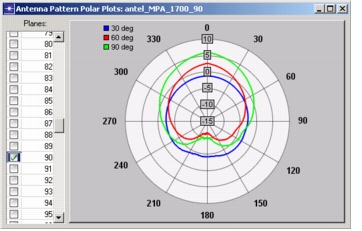
This view of an antenna pattern shows a polar plot of gain (in dB) versus azimuth angle. It shows horizontal slices of the antenna pattern in one or more polar planes (elevation angles), as viewed from below the pattern.
Figure 80: Polar Plot
To display the polar plot:
Procedure 37: Displaying a Polar Antenna Pattern Plot
-
Choose Antenna > Show Radial Plot of Polar Planes, or click the Show Radial Plot of Polar Planes toolbar button.
The polar plot opens in a separate window. The polar plane currently specified in the polar plane section (rectangular plot) is displayed.
-
Choose the polar planes to be displayed by selecting their checkboxes in the Planes table.
Note: You can quickly display only the polar plane shown in the rectangular plot by selecting the "Display only current plane in radial display" checkbox under the Polar Plane Section tab.