Smoothing an Antenna Pattern
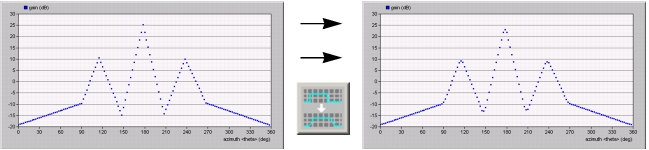
This operation rounds out the sharp edges and spikes in a graph. The smoothing algorithm works by sliding a “window” forward along the abscissa of the graph. A dialog box prompts you for the size (in points) of this window; the default setting is three points.
Note: This operation smooths only the polar plane shown in the graph. To smooth the entire pattern, do this operation on each plane.
To smooth the antenna pattern, choose Antenna > Smooth (or click the Smooth the Function toolbar button).
Figure 77: Antenna Pattern Before and After Smoothing