Defining an Antenna Pattern via an External Library
You can specify an external library that will return a gain value for a given pair of polar,azimuth angles. The Antenna Pattern Editor will use this library to fill the gain table by calling the library’s _gain function once for each cell in the table. Discrete event simulations will use the library to obtain a precise value whenever antenna gain in a specific direction is needed.
To specify an external library:
Procedure 32: Specifying an External Library
-
If necessary, open the antenna pattern in the Antenna Pattern Editor.
-
If you have not created the external library you want to use, do so now (as described in Building an Antenna Pattern Library).
-
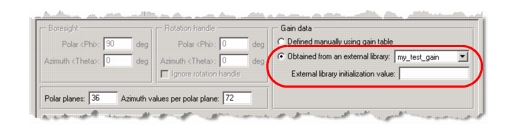
Select your external library from the pull-down menu.
-
If the library uses an initialization value, enter it in the “External library initialization value” field.
-
Select the “Obtained from an external library” checkbox.
An antenna pattern generated from the named library replaces the current pattern. The gain table and all views are updated.
Antenna Pattern External Library Definition
An external code library used to define an antenna pattern comprises a single C or C++ file containing three function definitions:
<lib_name>_open<lib_name>_gain<lib_name>_close
The source file for this library must be named <lib_name>.ex.c (or .cpp, if written in C++) and saved in a directory listed in the mod_dirs preference. Use this source file to build the external library specified in the antenna pattern model (as described in Building an Antenna Pattern Library).
<lib_name>_open()
This function is invoked
- by DES, when the simulation starts (before the receiver groups are first computed) and when the “pattern” attribute of an antenna module is modified.
- by the GUI, when the library is associated with an antenna pattern in the Antenna Pattern Editor.
The _open function should set up a pointer to any state information to be passed to the other library functions, as well as the boresight and rotation handle vectors for the pattern. This information is included in the AntnT_Init_Info structure, as defined in <install_dir>/sys/include/op_antn_gain.h.
Figure 73: <lib_name>_open Prototype
VosT_Fun_Status
<lib_name>_open (AntnT_Init_Info * info_ptr);
<lib_name>_gain()
This function is invoked by DES or the GUI when a gain value is needed. If a gain cannot be computed, the function should return 0.0.
Figure 74: <lib_name>_gain Prototype
double
<lib_name>_gain (void * state_ptr,
   double polar         /* 0 … 180 */,
   double azimuth       /* 0 … 360 */,
   void * extra_data_ptr /* arbitrary structure passed to call when using */
                              /* op_tbl_pat_gain_ext; VOSC_NIL otherwise     */);
<lib_name>_close()
This function is invoked as follows:
- by DES when the simulation ends and when the pattern associated with an antenna module is replaced by another
- by the GUI when the library is no longer associated with an antenna pattern in the Antenna Pattern Editor
Figure 75: <lib_name>_close Prototype
VosT_Fun_Status
<lib_name>_close (void * state_ptr);
Antenna Pattern External Library Example
#include "op_antn_gain.h"

static int global_var = 1234;

DLLEXPORT VosT_Fun_Status
my_test_gain_open (AntnT_Init_Info * info_ptr)
	{
	FIN (test_gain_open);

printf ("test_gain_open:\n");
printf ("called for pattern \"%s\"\n", info_ptr->antenna_pattern);
printf ("init string: \"%s\"\n", info_ptr->init_str);
#if defined (OPD_DES)
printf ("called for module %d\n", info_ptr->antenna_module);
#endif

	info_ptr->boresight_azimuth = 0.0;
	info_ptr->boresight_polar = 90.0;

	info_ptr->use_rotation_handle = OPC_TRUE;
	info_ptr->rotation_azimuth = 0.0;
	info_ptr->rotation_polar = 0.0;

printf ("state pointer set to %p\n", &global_var);
	info_ptr->returned_state_ptr = &global_var;

	FRET (VOSC_SUCCESS);
	}

DLLEXPORT double
my_test_gain_gain (void * state_ptr, double polar, double azimuth, void * extra_data_ptr)
	{
	double gain;
	FIN (test_gain_gain);

	/* way to look at things in GUI */
	/* polar: 0 - 180, azimuth: 0 - 360 */
	gain = (int)(polar) + ((int) azimuth / 1000.0);

	FRET (gain);
	}

DLLEXPORT VosT_Fun_Status
my_test_gain_close (void * state_ptr)
	{
	FIN (test_gain_close);
printf ("close proc\n");

	FRET (VOSC_SUCCESS);
	}
Building an Antenna Pattern Library
Use this procedure to build the shared object libraries that can be used in the Antenna Pattern Editor to specify antenna pattern gain. Two libraries are needed—one for the GUI (for use by the gain table) and one for discrete event simulations.
Procedure 33: Building an Antenna Pattern Library
-
Create a source file using the prototypes given in Antenna Pattern External Library Definition.
-
Open a Riverbed console and move to the directory containing the source file.
-
Use op_mko to generate the simulation and GUI object files. (For details on this process, see “op_mko” on page 179.) For example, on 32-bit Windows you could use the commands:
op_mko -type ex -m <lib_name> -kernel_type development -m32
op_mko -type ex -m <lib_name> -gui -m32
where
<lib_name>is the source file name (without extensions).Two object files are produced. This example would generate the files
<lib_name>.dev32.i0.ex.obj <lib_name>.gui32.i0.ex.obj -
Use op_mkso to generate the shared object libraries. (For details on this process, see “op_mkso” on page 185.) For example, on 32-bit Windows you could use the commands:
op_mkso -type antn -f <object_file> -m <lib_name> -m32
op_mkso -type antn -f <object_file> -m <lib_name> -gui -m32
where
<object_file>is the full name of the object file produced in step 3 and<lib_name>is the source file name (without extensions).Two shared object libraries are produced. This example would generate the files
<lib_name>.dev32.i0.antn.dll
<lib_name>.gui32.i0.antn.dll
In the Antenna Pattern Editor,
<lib_name>will appear in the list of available external libraries.