Creating a Job
A job is a server workload that is made up of processes and threads. Each job has its own user-specified ID (Job Name) that appears in the Jobs pane of the editor window after you create it.
Procedure 11: Creating a Job
-
From the main menu, choose Jobs > New Job…
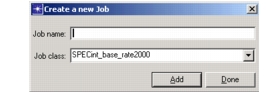
The Create a new job dialog box appears.
Figure 24: Create Job Dialog Box
-
Type the Job Name in the text field, then select the Job Class from the drop-down menu. For more information, see Job Classes.
-
Click Add to add the job to the Jobs list, then click Done to close the dialog box.
To create more than one job, click Add after you create each new job, then click Done to close the dialog box.
When you select a job name, the processes and threads that make up that job appear in the Job Processes/Threads pane of the editor window. For information about how to identify, assign, or unassign processes and threads to a job, see Editing Jobs.