Importing Data into Server Characterization Editor
You can import data into Server Characterization Editor from several data collectors. To achieve this, Server Characterization Editor uses a common format for import files based on the XML standard. For many data collectors, this requires a separate step to convert the file to XML format before you import the data into Server Characterization Editor.
Figure 8: Data Collection and Conversion Tasks
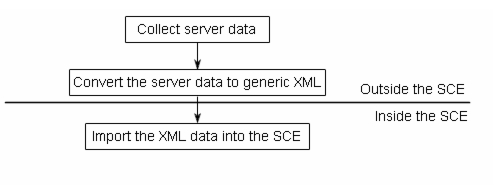
The method you use to create an import file depends on the data collector.
Data Types
You can import two types of data into Server Characterization Editor, as follows:
Summary Data
Summary data contains only one entry for each process and thread measured. Because summary data does not indicate the time period over which the data was collected, the time period needs to be added later. The advantage of summary data is that it contains a lot of information about the workloads in a small amount of space.
Time-Series Data
Time-series data samples the workloads periodically and records workload statistics at each sample. This can provide a higher resolution when studying specific workloads in detail, but adds overhead to the data collection task.