Import Properties
After importing data into Server Characterization Editor, you are prompted for summary information about the samples. Sometimes Server Characterization Editor provides this information based on the selected template or the system information contained in the data file.
Figure 9: Import Properties Dialog Box
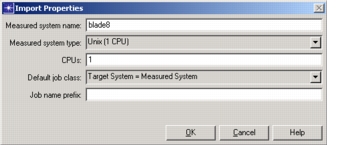
The following table lists the attributes in the Import Properties dialog box.
Table 3: Import Properties
| Attribute | Description |
|---|---|
| Measured System Name | Name of the server. |
| Measured System Type | Describes the server from which the samples are taken. When moving workloads from one platform to another, the relative performance of the platforms must be known, and this is the first step of that process. This field contains a list of all the servers recognized by Server Characterization Editor. |
| CPUs | Certain types of analysis are based on the number of processors in the system. This information is normally inferred from the data file, but in certain circumstances might not be available. In these cases, verify that the CPU count is correct. |
| Operating System | Platform on which the server is running. |
| Default Job Class | The default type of benchmark used by newly created jobs. As the default, it can be overridden by the individual jobs during the analysis phase. The standard SPEC benchmark types are specified in the drop-down list; you can add your own if the measured system supports it. However, there is no check done to verify that the measured system supports the benchmark specified, but this value may also be adjusted from within a simulation project. |
| Job Name Prefix | Often, when you analyze similar servers using templates, or when you analyze the same server many times, the same job name can be used in multiple characterizations. To make the job names unique, you can designate a prefix that Server Characterization Editor adds to the job name when it exports the job. For example, if your job name is “http” and your job name prefix is “server1_”, the job name becomes “server1_http” when you export the job. |