Setting the Transmission Range of Nodes
The transmission range of WLAN models is dynamic. The range is a function of receiver sensitivity, transmission power, and pathloss. You can configure the transmitter power and receiver sensitivity on each wireless LAN device, as described in this section. When two wireless LAN nodes are within the transmission range, then the transmissions of the sending node will be detected by the receiving node, and transmissions can be successfully received.
Note: Transmissions may experience bit errors due to collisions, interference, or background noise, which can cause transmissions to fail, even if the sender and receiver are within transmission range of each other.
Each attribute jointly affects the transmission range of each WLAN packet. With default values and logic of these parameters, the resulting maximum transmission range is slightly more than 1000 meters. The model will produce a simulation warning if it detects that there are at least two WLAN nodes in the network that belong to the same wireless LAN (BSS) and the distance between the nodes is more than 300 meters, which is the maximum distance within a BSS allowed by the IEEE 802.11 standard.
Following are the transmission range values (in meters) for some wireless LAN data rates when the default values for transmission power (= 0.005W) and packet reception-power threshold (= -95 dBm) are used. Please note that these distances are for 2.4 GHz band, which is used by 802.11, 802.11b, and 802.11g PHYs. When the wireless LAN nodes deploy the 802.11a PHY, which uses the 5 GHz band, the transmission range value for an 802.11a data rate is shorter than the range of the same data rate when using the 802.11g PHY.
- 54 Mbps : ~371 meters
- 36 Mbps : ~565 m
- 18 Mbps : ~987 m
- 6 Mbps : ~995 m
- 11 Mbps : ~1094 m
- 5.5 Mbps : 1244 m
- 2 Mbps : 1244 m
- 1 Mbps : 1244 m
Now, for getting the value of the new transmit power (TP) for a required range (x meters), the following calculation can be done:
TP_new = TP_old / pow ((old_range / x), 2)
Reception Power Threshold (Receiver Sensitivity)
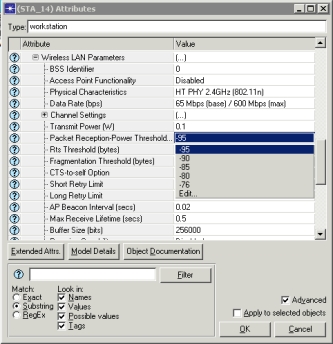
The power of a received packet is inversely proportional to the distance that it travels (i.e., the greater the distance between the transmitter and receiver, the lower the received power.) The lower the reception power threshold, the greater the transmission range of a packet will be, since packets with lower power will be accepted by the radio receiver. Configure Reception Power Threshold in the attribute “Wireless LAN Parameters > Packet Reception-Power Threshold,” as shown below.
Figure 670: Reception Power Threshold
Transmission Power
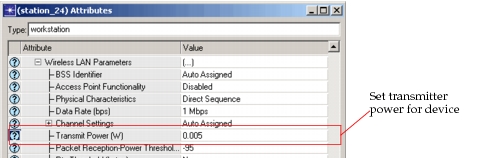
The second attribute that affects the transmission range of a node is the transmission power. The higher the transmission power, the greater the distance over which the packet can be transmitted. Configure transmission power in the attribute “Wireless LAN Parameters > Transmit Power.”
Figure 671: Setting Transmitter Power
Pathloss
The third attribute that affects the transmission range of a node is the path loss between the transmitter and receiver. Pathloss results in a drop in the intensity of the transmitted packet. The greater the pathloss, the lower the received power of the packet, resulting in a drop in the transmission range. The pathloss for the WLAN models is computed in the radio pipeline stage, “wlan_power”.