Model Attributes: Wireless LAN
The following attributes are available for configuring WLAN network models.
Local Attributes
Each wireless node has the same set of wireless LAN attributes, shown below. These attributes are grouped under the Wireless LAN Parameters compound attribute. Each node also contains a Wireless LAN MAC Address parameter, which is an internal station address that is usually set as auto-assigned, unless specific configuration is required. You can configure the WLAN parameters on a per-interface basis for nodes with multiple wireless interfaces.
Figure 657: Wireless LAN Parameters
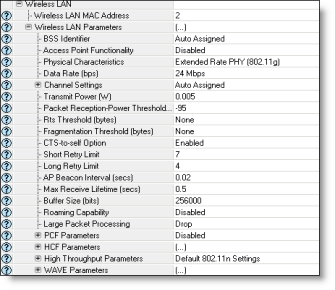
You can view descriptions of each attribute by clicking on the Details button in the Attributes dialog box.
Simulation Attributes
WLAN AP Connectivity Check Interval
This attribute is used in scenarios where Beacons are disabled via the WLAN Beacon Efficiency Mode simulation attribute, and roaming is enabled through the Roaming Capability attribute. It determines the interval time, in seconds, that an STA evaluates its connectivity with its AP and scans for other APs, if necessary.
WLAN Beacon Transmission Count
The WLAN Beacon Transmission Count simulation attribute lets you disable beacons in Wireless LAN networks. The beacons are sent by APs and used by STAs to evaluate the AP of the current radio channel that is being scanned or that has been chosen by the roaming STA. This is useful in an infrastructure BSS, where periodic beacons are not needed. To disable this efficiency feature (and send regular beacons), set this attribute to Periodic. To enable this feature, set the attribute to a positive integer value, which specifies the number of beacons to send before discontinuing beacon transmission.
WLAN Transmission Candidacy
When this attribute is enabled, the communication and interference of WLAN nodes in a subnet are completely turned off with the WLAN nodes that are not in the same subnet—regardless of their WLAN configuration, physical layer configuration, and distances to the nodes in the subnet.