Configuring 802.11p WAVE
This section describes how to configure 802.11p WAVE parameters, shown in the figure below.
Figure 668: WAVE Parameters
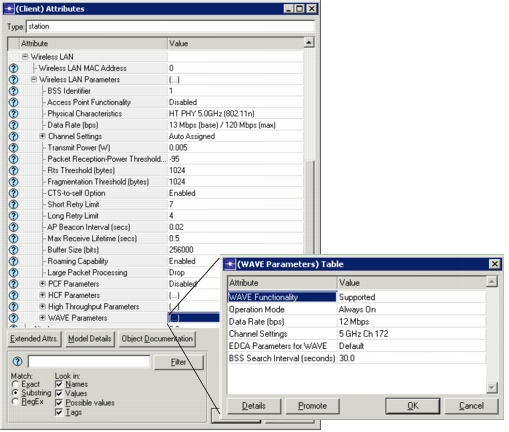
WAVE Functionality— Set this attribute to “Supported” to enable 802.11p.
Operation Mode— Specifies how a Wireless LAN node will operate in relation to the 802.11p network.
- Always On— When set to this mode, the MAC will always operate in WAVE (802.11p) mode, ignoring the values of the following sub-attributes of Wireless LAN Parameters attributes:
- BSS Identifier
- Physical Characteristics
- Data Rate
- Channel Settings
- Roaming Capability
Note: The above attributes are not part of the “Wireless LAN Parameter > WAVE Parameters” but are found directly under “Wireless LAN Parameters.”
- When No BSS Found— This setting enables switching between configured PHY technology and WAVE operation
- “Wireless LAN Parameters > Roaming Capability” must be enabled for switching to occur and the wireless node must belong to an infrastructure BSS.
- The wireless node will first operate using its configured PHY technology.
- If the wireless node becomes disconnected from its AP and cannot find another AP to which to connect after scanning all the operational channels of its configured PHY technology once, the wireless node will switch to WAVE operation.
- During WAVE operation, the wireless node will periodically switch to its configured PHY technology and scan all the operational channels once. If a suitable AP is found in one of the channels, then the wireless node will terminate WAVE operation and will associate with that AP.
- The periodicity of the operational channel scans during WAVE operation can be set using the attribute: “Wireless LAN Parameters > WAVE Parameters > BSS Search Interval.”
Channel Settings— Specifies the frequency band that will be used by the radio transmitter and receiver connected to the MAC, when the MAC is operating in WAVE mode. In addition to standard seven 10-MHz 802.11p channels, this attribute allows you to configure custom channels, but the use of such custom channels will not affect the configured 802.11p data rate.
802.11p capable nodes will only use their configured 802.11p channel during WAVE operation; they will not switch between 802.11p channels. Thus, two 802.11p capable nodes can communicate with each other only if they are using the same 802.11p channel.
EDCA Parameters for WAVE— Specifies the configuration of the parameters of the HCF EDCA (Enhanced Distributed Channel Access) mechanism while operating in WAVE mode. To use standard specified default values for all EDCA related parameters during WAVE operation, set the value of this attribute to “Default”.
BSS Search Interval— When Operation Mode is set to “When no BSS found,” specifies the periodicity of the operational channel scans during WAVE operation. Default: 30 seconds.
Note the following:
- MANET can be used to support multi-hop IP connectivity within WAVE network if needed
- During WAVE operation, A-MSDUs and A-MPDUs are not supported.
- 802.11p capable nodes are assumed to also be 802.11e capable. If 802.11p functionality is enabled for a wireless LAN node, but 802.11e (HCF) functionality is not enabled, then HCF functionality is turned on at the beginning of the simulation for that node, thus overwriting its configuration.