Configuring Wireless LAN Parameters
You can configure parameters for the WLAN protocol on each wireless LAN device in the network. The Wireless LAN Parameters compound attribute includes sub-attributes for setting the transceiver channels and BSS IDs, for example.
Setting the BSS Identifier
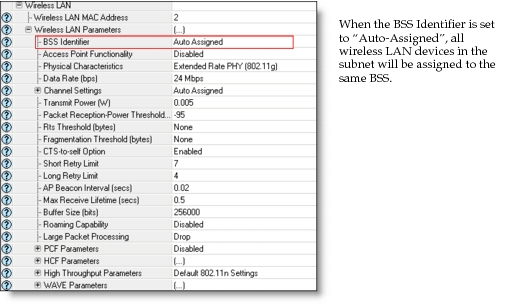
Wireless LAN devices function as a member of a basic service set (BSS). A BSS is characterized by a unique BSS identifier (BSS ID). The BSS ID of a wireless LAN station or wireless LAN port/interface is configured in the attribute Wireless LAN Parameters > BSS Identifier. BSS IDs may be auto-assigned, such that all devices within a subnet belong to the same BSS, or you may manually configure the BSS ID by setting the attribute on each device.
Note: If a node has multiple wireless LAN interfaces/ports, you must assign BSS IDs manually to each interface or port. When you configure the BSS ID manually on one device in the scenario, you must configure the BSS ID manually on all wireless LAN devices.
Figure 658: Wireless LAN—BSS Identifier
Setting the Physical Characteristics
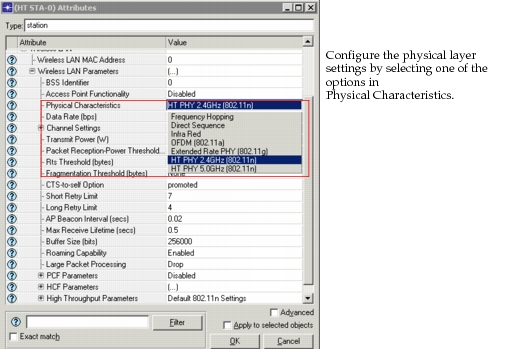
All the wireless LAN devices in a given BSS must be configured with similar or compatible physical layer settings. The physical layer of a wireless LAN device can be configured in the attribute Wireless LAN Parameters > Physical Characteristics, as shown below. The following physical layer characteristics are compatible with one another in the 2.4GHz frequency band: 802.11b, 802.11g, and 802.11n. In the 5GHz frequency band, 802.11a and 802.11n are compatible with one another.
Figure 659: Wireless LAN—Physical Characteristics
Setting the Data Rate
Once the physical layer is set, choose a compatible data rate from the options available in the attribute Wireless LAN Parameters > Data Rate. The devices in the same BSS can have different data rates. Figure 662 in the next section shows an example of selecting a data rate that is compatible with the physical characteristics.
Setting the Access Point Functionality
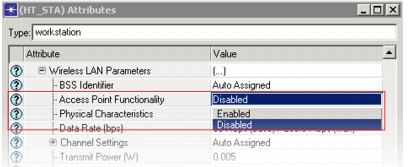
A wireless LAN BSS could be an ad-hoc BSS or an infrastructure BSS. In an ad-hoc BSS, none of the wireless LAN devices in the BSS has access point functionality enabled. In an infrastructure BSS, one wireless LAN device in the BSS will function as an access point. Access point functionality can be enabled in a wireless LAN device by enabling the attribute Wireless LAN Parameters > Access Point Functionality, as shown below. Only one access point is permitted in a BSS.
Figure 660: Wireless LAN—Enable Access Point Functionality
Configuring Channel Settings
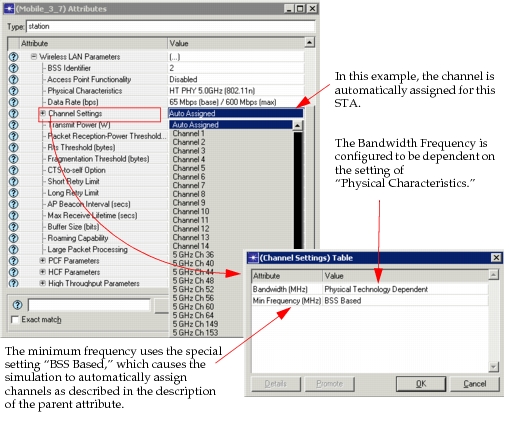
The preferred operating channel of a BSS can be set by configuring the attributes under Wireless LAN Parameters > Channel Settings, which is also the primary channel if the STA is operating in 40MHz band. Only channel numbers 1 to 11 in 2.4GHz frequency and channel numbers 36, 40, 44, 48, 52, 56, 60, 64, 149, 153, 157, and 161, support 40MHz operation in an 802.11n capable STA.
You can enable 40MHz operation support in an 802.11n capable STA by setting the Wireless LAN Parameters > High Throughput Parameters > 40MHz Operation Parameters > Status to “Enabled.” Depending on the primary channel number, a specific secondary channel is assigned, as per Table J.1 in Annex J of IEEE 802.11n. "Auto Assigned" is a special value; when used, simulation sets the channels according to the BSS ID, whether that BSS operates with 2.4GHz frequency band or 5GHz frequency band and whether the BSS is an 802.11n BSS capable of 40MHz operation. When there are 802.11n BSSs capable of 40MHz operation in the scenario, the channel auto-assignment follows the channel selection rules mentioned in section 11.14.3 in IEEE 802.11n.
Figure 661: Wireless LAN—Channel Settings
Rapid Configuration Using the Wireless Deployment Wizard
Using the Wireless Deployment Wizard, you can rapidly create a scenario with multiple infrastructure BSS’s or a single ad-hoc BSS. While creating the scenario with multiple infrastructure BSS’s, you can specify the number of BSS’s by configuring the “Number of Cells” in the Wireless Deployment Wizard. A BSS configured using the Wireless Deployment Wizard will have a unique BSS ID, and all wireless LAN devices under a BSS are assigned to the same BSS ID. The Wireless Deployment Wizard also allows you to specify the type of wireless LAN physical layer, and the data rate to be configured on all wireless LAN devices in the scenario.