Table Structure Definitions
This section discusses each of the table structures that have been implemented within the HAIPE model to date. The details of each table will be described so that its purpose and role within the model can be easily understood.
Note: Not every table is required to be configured for every simulation. The tables that must be configured (and how they are configured) will depend on the network architecture as well as the simulation use case selected.
Plain Text Security Policy Database (PT SPD)
The PT SPD contains a number of inbound and outbound security policies that can each be configured to Bypass or Discard traffic. Each of these security policies contains a number of selectors that are used to match the policy to traffic. In this sense, a security policy is very similar to an extended ACL statement (i.e. matches are done using IP and next protocol header information).
A description of the types of PT security policies found in the PT SPD is shown in the table below. As you can see from the descriptions, the PT SPD will only be applied to PT traffic.
Table 65: PT Security Policy Type Descriptions
| PT Security Policy Types | Description |
|---|---|
| Inbound Security Policy | Applied to all PT traffic (control and data) that is received on the PT interface |
| Outbound Security Policy | Applied to all PT traffic (control and data) before it can be sent out the PT interface |
The PT SPD is an ordered list of security policies. When a packet is received, the PT SPD will, in order, apply the packet to each security policy configured for the direction the packet is traveling in until the packet matches one. When that happens, the action configured for the security policy will dictate what is done to the packet. The table below describes each of the potential actions for PT security policies. If the packet does not match any of the security policies, an implicit Discard policy will cause the packet to be dropped.
Table 66: PT Security Policy Action Descriptions
| PT Security Policy Actions | Description |
|---|---|
| Bypass | Traffic will be allowed to pass through the PT SPD in the direction the traffic is currently traveling. |
| Discard | Traffic will be dropped. |
Cipher Text Security Policy Database (CT SPD)
The CT SPD contains a number of inbound, inbound-SA, and outbound security policies that can be configured to Bypass, Discard, or cryptographically Protect traffic using either Pre-Placed or Firefly keys. Each of these security policies contains a number of selectors that are used to match the policy to traffic. Just as with the PT SPD, a security policy configured within the CT SPD is very similar to an extended ACL statement (i.e. matches are done using IP and next protocol header information).
A description of the types of CT security policies found in the CT SPD is shown in the table below. As you can see from the descriptions, the CT SPD has more types than the PT SPD and will be used to filter PT and CT traffic (depending on the type).
Table 67: CT Security Policy Type Descriptions
| CT Security Policy Types | Description |
|---|---|
| Inbound Security Policy | Applied to any non-ESP CT traffic received on the CT interface. ESP traffic is NOT applied to Inbound CT security policies because those packets are immediately passed to the cryptographic core. |
| Inbound-SA Security Policy | Applied to all PT traffic (control and data) received on an inbound SA that has completed the decryption process. |
| Outbound Security Policy | Applied to all PT traffic (control and data) before it can be sent out the CT interface or passed to the cryptographic core for encryption. |
The CT SPD is an ordered list of security policies. When a packet is received, the CT SPD will, in order, apply the packet to each security policy configured for the direction the packet is traveling in until the packet matches one. When that happens, the action configured for the security policy will dictate what is done to the packet. Unlike the PT SPD however, the Actions available for a security policy (i.e. Bypass, Discard, Protect-PPK, Protect-FF) will depend on the configured direction for that policy. This means that all available actions are not valid for all directions. The table below describes each of the potential actions for CT security policies as well as the types in which that action is available. If the packet does not match any of the security policies, an implicit Discard policy will cause the packet to be dropped.
Table 68: CT Security Policy Action Descriptions
| CT Security Policy Actions | Available Types | Description |
|---|---|---|
| Bypass | Inbound, Inbound-SA, Outbound | Traffic will be allowed to pass through the CT SPD in the direction the traffic is currently traveling. In the outbound and inbound directions, only control traffic should be bypassed. |
| Discard | Inbound, Inbound-SA, Outbound | Traffic will be dropped |
| Protect-PPK | Outbound | Traffic will be passed to the cryptographic core to be protected using a manually configured security association. In this case, the security policy will also dictate that a particular PPK Chain should be used so only security associations configured to use that particular PPK chain will be considered. |
| Protect-FF | Outbound | Traffic will be passed to the cryptographic core to be protected using a dynamically negotiated security association. In this case, the security policy will also dictate that a particular FFSA table entry should be used so only security associations configured to use the security parameters specified in that FFSA entry will be considered. If there are no security associations that match, then IKE will be used to negotiate a new SA. |
Security Association Database (SAD)
The SAD maintains all of the security associations that are available to a HAIPE to protect unicast and multicast traffic. A Security Association (SA) defines the configuration of a tunnel between two (for unicast SAs) or more (for multicast SAs) HAIPE systems so that secure communication is possible. Security mechanisms/parameters and encryption keys must be common across the connection. Security associations can be manually configured, or dynamically established using the Internet Key Exchange (IKE) protocol.
A security association has a direction associated with it (inbound or outbound). The HAIPE originating the traffic must have an outbound security association and the peer HAIPE receiving the traffic must have a matching inbound security association (i.e. same security parameters and key information) in order for communication to be possible.
In the HAIPE MIB, a set of selectors (similar in configuration and purpose to a security policy) must be configured for each SA. This is either done manually for manual SAs or via the FFSA table for dynamic (IKE negotiated) SAs. Traffic, after passing through the outbound CT SPD, must then be compared to the selectors configured for the outbound SAs in the SAD such that a match is found. This allows for multiple security associations to the same peer to be used for different types of traffic.
The HAIPE model deviates slightly from the HAIPE MIB architecture by directly linking the CT SPD to the SAD. The requirement to configure selectors on the security association has been removed. Instead, the outbound and inbound-SA security policies (described earlier in the section on the CT SPD) must be linked to the manually configured SAs or to the FFSA table entries. The figure below shows an example of linking outbound CT SPD policies to a manually configured outbound security association.
Figure 153: Linking CT SPD to the SAD Example
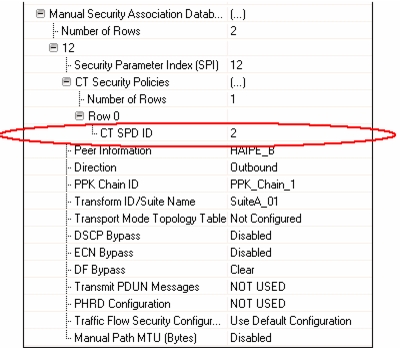
In the figure shown above, the manually configured outbound security association with SPI 12 has been linked to a single CT outbound security policy with ID 2. In the outbound direction, this configuration makes this outbound SA available to traffic Protected by the CT outbound security policy with ID 2. Even if there are many more CT security policies configured with a Protect-PPK action, this security association can only be used by the policy with ID 2. So, outbound security associations can be configured so that they are available to only a subset of allowable traffic just like the HAIPE MIB architecture. Alternatively, the CT Security Policies attribute shown above can also be configured as "Any" which would make the security association available to traffic protected by any outbound CT security policy.
In the inbound direction, the operation is reversed. Additionally, the CT Security Policies specified on the inbound security association are no longer outbound security policies, but rather inbound-SA security policies. The inbound security association is first used to decrypt the packet and then the inbound-SA security policies specified on the SA are applied to the packet. So either a subset of the available inbound-SA security policies in the CT SPD will be applied to the packet or, if the CT Security Policies attribute is configured as "Any", all of the inbound-SA policies in the CT SPD will be used.
So, while the model implementation deviates slightly from the MIB architecture, the results of the operation are the same. The following figure shows the relationship between the PT SPD, CT SPD and SAD.
Figure 154: PT SPD, CT SPD, and SAD Relationships

Local Enclave Prefix Table (LEPT)
The LEPT contains a list of the known PT address prefixes that this HAIPE is fronting. The contents of this table can be populated manually, or through the use of PT network discovery mechanisms (i.e. RIP). The table should contain a list of all known prefixes for the local enclave that this HAIPE fronts.
Note: While RIP is currently the only PT network discovery mechanism available, it is not required for the whole PT enclave to run RIP. The PT router directly connected to the HAIPE can be configured to redistribute PT routes it learns into RIP which would then allow the HAIPE to learn them.
The LEPT is used as a filtering mechanism to ensure the HAIPE only introduces unicast packets into its PT enclave that are destined for networks it knows it is protecting. Prior to sending any unicast packet out the PT interface, the LEPT is checked to make sure that the HAIPE is fronting the intended destination. If there is no LEPT entry that matches the packet's destination IP address then the packet will be dropped. The LEPT is also used during Peer Discovery when the HAIPE has to decide whether it should advertise reachability to a particular PT network prefix.
Peer Enclave Prefix Table (PEPT)
The Peer Enclave Prefix Table (PEPT) defines a mapping of PT destination network addresses to the peer HAIPE(s) fronting those network addresses. The contents of this table can be populated manually or through the use of a discovery protocol (i.e. GDC).
The PEPT is used by HAIPE in a manner similar to how a router uses an IP forwarding table. Before any unicast packet can be provided cryptographic protection, the peer HAIPE fronting the destination address must be identified via a PEPT lookup. If there is a PEPT match for that destination address, the packet will be protected using HAIPE traffic protection mechanisms and sent via an SA to the specified peer HAIPE. If there is no PEPT entry that matches the destination address then the packet will be dropped. Additionally, if the PEPT lookup fails, a Peer Discovery protocol can be initiated to dynamically discover the peer HAIPE that is fronting the unknown PT destination network.
Multicast Address Mapping Table
The Multicast Address Mapping table defines a mapping of PT multicast addresses to CT multicast addresses. Mappings may be set using a single PT to single CT configuration, or a multiple PT to single CT configuration. This table can only be populated via manual configuration. Discovery of PT' CT multicast address mappings is not possible.
Before any multicast packet can be provided cryptographic protection, the CT multicast address to use must be identified via a Multicast Address Mapping Table lookup. If this lookup fails, then the multicast packet will be dropped.
Firefly Security Association (FFSA) Table
There are a number of security and network parameters available for manual security associations (i.e. DSCP Bypass, PHRD Configuration) that are not possible to negotiate using the HAIPE IKE protocol. The FFSA table contains a set of configurations used to help IKE create dynamic security associations that use those parameters.
The entries in the FFSA table are mapped to Protect-FF outbound CT security policies (CT SPD). When a packet matches an outbound Protect-FF CT policy, the information found in the corresponding FFSA Table entry is provided to HAIPE IKE.
Registration Transmission Address Table (RTAT)
The RTAT contains a list of destination IP addresses (multicast, unicast, anycast, or otherwise) and port numbers for the GDC Client running on a HAIPE to use during the registration process. Each entry in this table is used by the HAIPE to send GDC Registration messages to a single GDC server (in which case the destination IP address will be a unicast address) or group of GDC servers (in which case the destination IP address will be a multicast address). All address listed in this table are PT destination addresses.
Note: If the specified address is within a remote enclave, the PEPT will also need to be populated with a manual entry to indicate behind which remote HAIPE the GDC server lies so the message can actually be sent.
If the destination address is a multicast address, then the Multicast Address Mapping Table will need to be properly populated with the correct PT' CT mapping.
Solicitation Transmission Address Table (STAT)
The STAT contains a sequence of IP addresses (multicast, unicast, anycast, or otherwise) that discovery Solicitation Request messages should be sent to. The addresses listed in this table are the PT addresses of a given discovery delivery destination. Additionally, each entry in the table has a PT destination address range assigned to it. The destination address, destination port and discovery protocol to use for the Solicitation Request message is identified by doing a STAT lookup using the PT destination IP address of the packet that requires discovery protocol services. This allows the table to be used for sending solicitations for multiple discovery protocols.
Note: If the specified address is within a remote enclave, the PEPT will need to be populated with a manual entry to indicate behind which remote HAIPE the discovery destination lies so the message can actually be sent.
If the destination address is a multicast address, then the Multicast Address Mapping Table must be properly populated with the correct PT' CT mapping.
Solicitation Reception Address Table (SRAT)
The SRAT contains a sequence of IP addresses (multicast, unicast, anycast, or other) from which the HAIPE will accept discovery Solicitation Requests. The addresses listed in the SRAT are the PT addresses of a discovery delivery destination. Also, each entry in the table has a destination port and dynamic discovery protocol that must match for the received Solicitation Request message to be accepted locally by the HAIPE. When a HAIPE accepts a Solicitation Request message, it uses the target IP Address specified in the message to do an LEPT lookup and determine whether the HAIPE is protecting that IP address. If the HAIPE is protecting the target IP Address, the HAIPE constructs a Solicitation Response message for the protocol specified in the SRAT and informs the querying HAIPE that it is protecting the unknown prefix.
If the destination address is a multicast address, the Multicast Address Mapping Table must contain the correct PT to CT mapping. Also, the IGMP Host Mode must also be enabled so that the HAIPE is guaranteed to receive the traffic destined for that multicast address.