Visualizing HAIPE
The following visualization features are available for HAIPE:
Connectivity Analysis
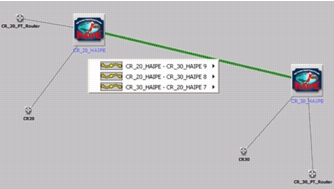
You can quickly visualize HAIPE peer and SA connectivity. This feature provides a simple view for analysis of HAIPE SAs and PEPT relationships. To run the connectivity analysis tool navigate to Protocols > IP > HAIPE > Connectivity Analysis. From here you can visualize connectivity using Flow Analysis or DES output tables. For this visualization to work, the appropriate reports must have been collected.
Figure 160: HAIPE Connectivity Analysis
HAIPE Version
You can view version of HAIPE that is running on a device in the workspace. To do this, select View > Visualize Protocol Configuration > HAIPE Versions.
Figure 161: Viewing the HAIPE Version in the Workspace
