Connecting HAIPE Devices
You can add a HAIPE device to an existing scenario by dragging and dropping a haipe_adv node from the HAIPE object palette. HAIPE devices have two Ethernet interfaces: one PT interface and one CT interface. After you have added the HAIPE device to the workspace, first connect the PT interface to the network you want to protect (unencrypted or red network); then connect the CT interface to the network you want to use as the transit/backbone network (encrypted or black network).
You can make sure that you have connected the interfaces to the appropriate network by checking the port assignments on the links connecting the HAIPE device to the unencrypted and encrypted networks. To check the PT interface, right-click on the link connected to the unencrypted network and select Edit Ports... from the menu. Verify that the port used on the HAIPE device is the interface named PT. Similarly, make sure that the encrypted interface is connected to the interface named CT interface.
Figure 155: Verifying PT Interface Connectivity
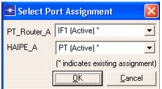
If the links are connected to the wrong interfaces, you can swap the ports being used by setting one of the interfaces as Unassign and switching the other interface to the now available port. Finally, go back to the original interface and change it from Unassign to the correct port.