Troubleshooting HAIPE Simulations (DES)
This section describes some features that are available for debugging unexpected behavior and results seen while using the HAIPE model.
HAIPE ODB Support
The OPNET Debugger (ODB) can be used when trying to determine the cause of packet drops or other unexpected behavior within the HAIPE device during a discrete event simulation.
The following table lists commands that enable a packet-by-packet analysis of each of the HAIPE family of protocols.
Table 90: ODB Support for HAIPE
| ODB Command | Description |
|---|---|
ltrace haipe |
Displays information in the ODB window related to the HAIPE processing of inbound and outbound data packets as well as control messages |
ltrace haipe_ike |
Displays information in the ODB window related to all HAIPE IKE events such as sending/receiving HAIPE IKE messages, processing commands from HAIPE, etc. |
ltrace ike |
Displays information in the ODB window related to all IKE module level messages, commands and initialization. |
ltrace gdc |
Displays information in the ODB window related to all Generic Discovery Client events such as sending/receiving/retransmitting GDC messages, processing commands from HAIPE, etc. |
The following table lists commands that let you stop the simulation before a certain type of event occur.
Table 91: HAIPE ODB Breakpoint
| ODB Command | Description |
|---|---|
lstop haipe_breakpoint_packet |
Stops the simulation when a packet (any packet) is first being processed by the HAIPE module. |
lstop haipe_breakpoint_local_proc |
Stops the simulation when a packet is first received locally from the higher layer |
lstop haipe_breakpoint_pt_proc |
Stops the simulation when a packet is first received on the PT interface |
lstop haipe_breakpoint_ct_proc |
Stops the simulation when a packet is first received on the CT interface |
lstop haipe_breakpoint_pdun_proc |
Stops the simulation when a PDUN packet is received. A PDUN message will only be processed after the decryption of an ESP packet has been completed. |
lstop haipe_breakpoint_phrd_proc |
Stops the simulation when a PHRD packet is received. A PHRD message will only be processed after the decryption of an ESP packet has been completed. |
lstop haipe_breakpoint_redist_proc |
Stops the simulation when a redistribution interrupt (from another protocol such as RIP) has been received. |
lstop haipe_breakpoint_failure_proc |
Stops the simulation when a Failure interrupt for the HAIPE node has been received and the condition of the node has changed (to failed). |
lstop haipe_breakpoint_recovery_proc |
Stops the simulation when a Recovery interrupt for the HAIPE node has been received and the condition of the node has changed (to active). |
lstop haipe_ike_breakpoint_exchange_proc |
Stops the simulation when a new command is received at the HAIPE IKE process from the HAIPE process |
lstop haipe_ike_breakpoint_receive_proc |
Stops the simulation when a new message is received by the HAIPE IKE process |
lstop haipe_ike_breakpoint_send_proc |
Stops the simulation before a message is sent by the HAIPE IKE process |
lstop gdc_breakpoint_command_proc |
Stops the simulation before a new command is processed by the GDC process (either client or server) |
lstop gdc_breakpoint_message_proc |
Stops the simulation before a new message is processed by the GDC process (either client or server) |
lstop gdc_breakpoint_timer_proc |
Stops the simulation when a timer is expiring in the GDC process (either client or server) |
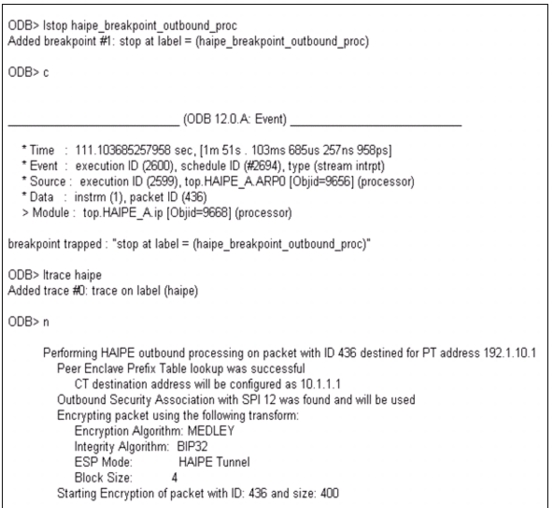
These commands can be used together to view information about how packets are processed by the HAIPE devices in a network.
Figure 166: Sample Output from ODB for a HAIPE-Enabled Network
DES Log
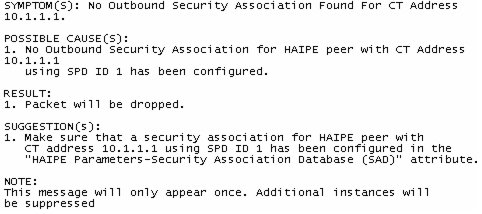
You should also check the DES Log (DES > Open DES Log menu operation) for any HAIPE-related errors.
Figure 167: HAIPE DES Log Entry
Flow Analysis HAIPE Failures Report
The Flow Analysis HAIPE Failures report that was presented in the Model Outputs section earlier in this document is a good place to start when debugging HAIPE Flow Analysis simulation errors. When a demand traversing a HAIPE is dropped due to non-standard behavior it gets recorded in the HAIPE Failures report. Reasons for the demand being dropped are also provided.
Figure 168: HAIPE Failures Flow Analysis Report Sample Output
