HAIPE Reports
Discrete Event Simulation
The HAIPE model contains a number of DES reports that can be collected by each HAIPE device at different times throughout the simulation. These reports provide insight into the state of some of the HAIPE table structures at certain points in time. All HAIPE reports are configured in the “Reports” attribute.
Figure 164: Configuring HAIPE DES Reports
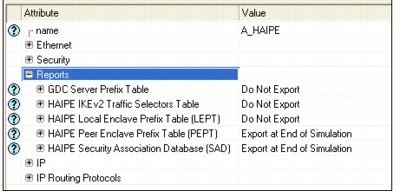
Not all reports are always available. For example, since the LEPT table structure is not part of the HAIPE model when the configured version is 1.3.5, the ability to export the LEPT will not be available if a device is configured with that version of the HAIPE IS. The following DES reports are available for HAIPE.
Table 88: HAIPE Discrete Event Simulation Reports
| Report | Description |
|---|---|
| GDC Server Prefix Table | Displays the contents of the GDC Server Prefix Table. The GDC Server Prefix Table is populated by the reception of registration messages from HAIPE devices running the GDC client. This report is available for export on HAIPE nodes as well as standalone GDC servers. |
| HAIPE IKEv2 Traffic Selectors Table | Displays the negotiated traffic selectors of SAs established via IKEv2. |
| HAIPE Local Enclave Prefix Table (LEPT) | Displays the contents of the Local Enclave Prefix Table (LEPT). The LEPT can be populated manually by the user, or dynamically via the RIP routing protocol that may be running on the HAIPE PT interface. |
| HAIPE Peer Enclave Prefix Table (PEPT) | Displays the contents of the Peer Enclave Prefix Table (PEPT). The PEPT can be populated manually by the user, or dynamically via discovery protocols (i.e. GDC). |
| HAIPE Security Association Database | Displays the contents of the Security Association Database (SAD). The SAD can be populated manually by the user, or dynamically via IKE. |
The PEPT and SAD reports will always be generated at the end of simulation regardless of the configuration of their corresponding attributes. These reports are used by the HAIPE Connectivity Analysis feature.
Flow Analysis
The HAIPE model contains a number of Flow Analysis reports that can be collected by each HAIPE device. These reports provide insight into the state of some of the HAIPE table structures at the end of the simulation. All of the HAIPE reports are configured under the “Choose Flow Analysis Reports” section of the “Configure/Run Flow Analysis” dialog box.
Figure 165: Configuring HAIPE Flow Analysis Reports
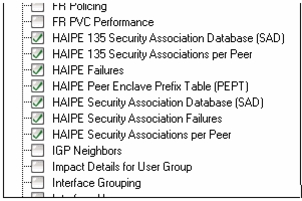
The following table lists the available Flow Analysis reports.
Table 89: HAIPE Flow Analysis Reports
| Report | Category | Description |
|---|---|---|
| HAIPE 135 Security Association Database (SAD) | Performance | Displays the contents of the Security Association Database (SAD) when the configured HAIPE version is 1.3.5 (the format of the SAD report changed after version 1.3.5). The SAD can be populated manually by the user, or dynamically via IKE. |
| HAIPE 135 Security Associations per Peer | Performance | Drilldown report from the HAIPE PEPT report. Displays a subset of the HAIPE 135 SAD report: all security associations that were used by this HAIPE device between a single peer HAIPE when the configured HAIPE version is 1.3.5 (the format of the SAD report changed after version 1.3.5). |
| HAIPE Failures | Performance | Displays all failures that occurred while trying to route traffic that traversed through this HAIPE. Most failures will result from a configuration error on the HAIPE. The category of the failure, as well as an in-depth description, is provided. |
| HAIPE Local Enclave Prefix Table (LEPT) | Performance | Displays the contents of the Local Enclave Prefix Table (LEPT). The LEPT can be populated manually by the user or dynamically by the RIP routing protocol, which may be running on the HAIPE PT interface. |
| HAIPE Peer Enclave Prefix Table (PEPT) | Performance | Displays the contents of the Peer Enclave Prefix Table (PEPT). The PEPT can be populated manually by the user, or dynamically via discovery protocols (i.e. GDC). |
| HAIPE Security Association Database (SAD) | Performance | Displays the contents of the Security Association Database (SAD) when the configured HAIPE version is not 1.3.5 (the format of the SAD report changed after version 1.3.5). The SAD can be populated manually by the user, or dynamically via IKE. |
| HAIPE Security Associations per Peer | Performance | Drilldown report from the HAIPE PEPT report. Displays a subset of the HAIPE SAD report: all security associations that were used by this HAIPE device between a single peer HAIPE when the configured HAIPE version is not 1.3.5 (the format of the SAD report changed after version 1.3.5). |
| HAIPE Security Association Failure | Performance | Displays all failures that occurred while trying to route traffic that traversed this HAIPE via a particular security association. Most failures will result from a configuration error on the HAIPE or the specified security association. The category of the failure, as well as an in-depth description, is provided. |