Enabling and Disabling View Constraints
View constraints control how the observer behaves when it approaches solid objects in the view, such as the ground, buildings, and vegetation. When constraints are enabled, the observer has a 1 meter bounding sphere that prevents it from moving through terrain or props.
Note: If view constraints are enabled, you may not be able to move the observer into buildings to view entities. Changing the near clipping plane or transparency will let you see through walls, but in constrained mode, you will still not be able to move the observer through the walls.
Procedure 50: Enabling or Disabling View Constraints
- Use one of the following methods:
- Press
/(slash). - Choose Observer > Constrain to Terrain.
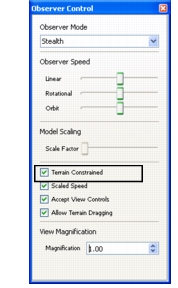
- On the Observer Control Panel (Figure 42), select or clear the Terrain Constrained checkbox.
- Click the Constrain to Terrain icon (
 )on the Observer Settings Toolbar.
- Press
Figure 42: Observer Control Panel