Observer Movement Functions and Keyboard Mappings
When you move the observer, you are executing observer movement functions. An observer movement function is a specific way that the observer can move, such as Move Observer Forward or Move Level Observer Forward. (These functions both move the observer forward, but they use different observer coordinate systems. Observer movement coordinate systems are described in 3D Observer Movement Coordinate Systems.)
The various movement functions are mapped to the keys on the keyboard and to mouse buttons and the mouse wheel. If you use the default key mappings for the default observer modes, then most of the time, the observer will behave exactly as you would expect it to. However for some types of movement, such as forward and back, the observer can move differently depending on the projection, the observer coordinate system, or the attach mode. Therefore, 3D Network Visualizer provides several key mappings that let you choose which type of observer movement to use. You can change these key mappings and create your own key mappings. (For details about editing key maps, please see Appendix D “Creating and Editing Key Mappings“ on page 531.) This section describes how observer movement can vary based on the observer coordinate system and the attach mode.
3D Observer Movement Coordinate Systems
In the 3D projection, the observer moves in the context of one of the following coordinate systems:
-
Level Observer Coordinates: Movement is with respect to the terrain. The level observer coordinate system is defined by the current up vector (Z), and a plane normal to that vector into which the observer's X and Y axes are projected. (Essentially, this means that the observer's heading is used while its pitch and roll are considered to be 0.0.)
Note: Movement is always with respect to a plane tangent to the earth’s surface. However, in a projected terrain database, such as UTM, Lambert Conformal Conic, or flat earth, the plane is fixed, whereas in a geocentric terrain database the up vector (and hence the tangent plan) changes as the observer’s position changes, so movement follows the curvature of the earth.
-
Observer Coordinates: Movement is with respect to the observer's body coordinate system.
-
Entity Level Body Frame Coordinates: Movement is with respect to an entity’s body frame, but ignores pitch and roll.
-
Entity Body Frame Coordinates: Movement is with respect to an entity’s body frame, including pitch and roll.
The practical difference between observer coordinates and level observer coordinates is that in level observer coordinates, if you are looking down at the terrain, when you move forward and backward, you fly over the terrain, looking down. In observer coordinates, when you move forward and backward, you move down towards the terrain or away from it at whatever angle you are oriented towards it.
The Attached Context and Observer Movement
The key maps control navigation using a particular coordinate system (observer frame or level observer frame). They also support navigation in alternate coordinate systems. The alternate system varies depending on the attached context of the observer. It represents Riverbed’s opinion of which alternate coordinate system would be most useful given the attach mode that the observer is using.
The Move Attached Context direction (forward, back, up, down, left, right) functions move the observer in the context of its attach mode. Movement is modified by attach modes in the following ways:
- Follow mode: movement is in the entity’s level body frame
- Track mode: movement is in the entity’s level body frame
- Mimic mode: movement is in the entity’s body frame
- Tether mode: movement is in level observer frame
- Unattached: movement is in level observer coordinates.
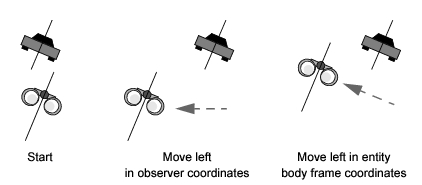
Figure 37 and Figure 38 illustrate the differences between moving the observer in an attached context and without an attached context.
Note: The figures in this chapter use binoculars to represent the observer.
Figure 37 illustrates movement in entity level body coordinates (Follow and Track modes). The Move Observer Left function (A in Observer Frame key map) moves the observer to the left in observer coordinates, that is left relative to the observer’s heading. The Move Attached Context Left function (Shift + A) moves the observer left in the attached context. In entity level body frame, this means the observer moves left relative to the entity’s heading.
Figure 37: Observer movement in entity level body frame coordinates
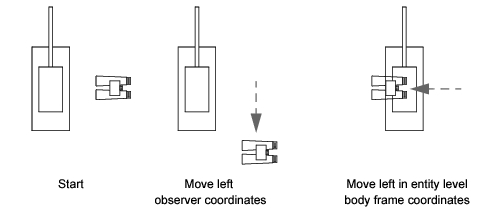
Figure 38 illustrates movement in entity body frame (Mimic mode). The Move Observer Left function moves the observer to the left in observer coordinates, that is left relative to the observer’s heading, but ignoring pitch and roll. The Move Attached Context Left function moves the observer left in the attached context. In entity body frame, this means the observer moves left relative to the entity’s heading and its pitch and roll.
Figure 38: Movement in entity body frame coordinates